

How does Make.com pricing work?
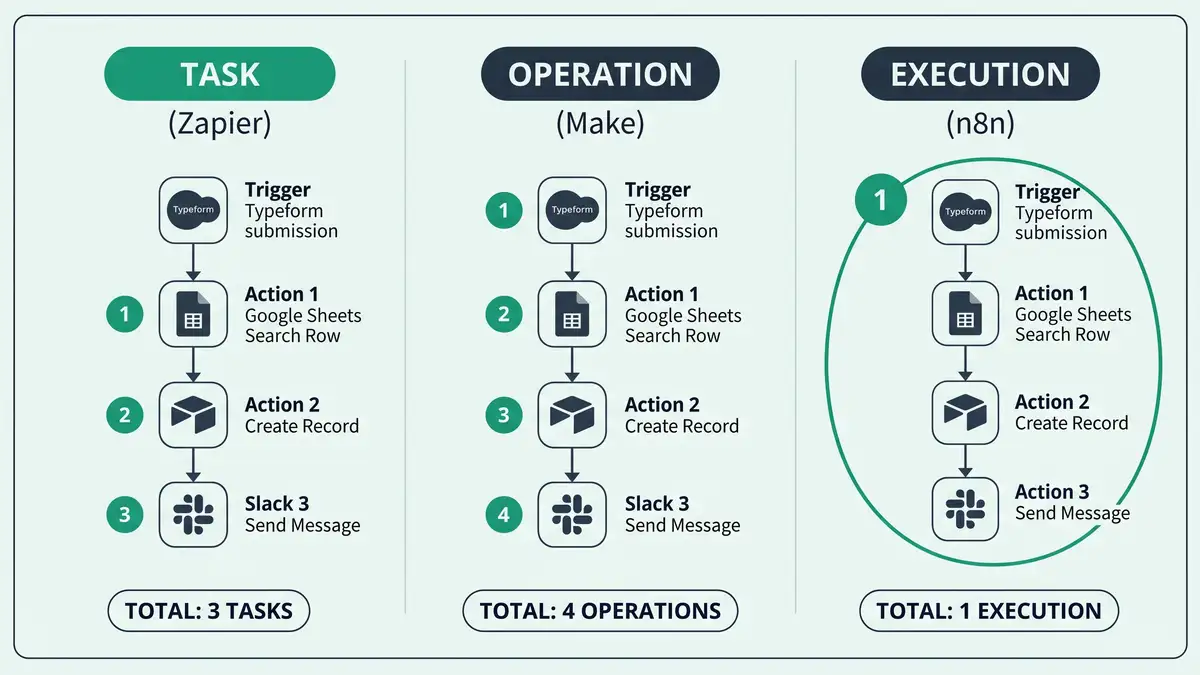
Make.com is usually the cheapest of the big three automation platforms per unit of work, and understanding why comes down to one word: operations. Make bills by the operation, where an operation is each individual module execution inside a scenario. A scenario with five modules that runs once consumes roughly five operations, which is a finer-grained meter than Zapier's per-task model but a busier one than n8n's per-execution model (Make Help). The headline prices look low, and for many mid-volume workloads they genuinely are, but the value depends entirely on how your scenarios are built.
One important 2026 change: on 6 November 2025, Make renamed operations to "credits" as its billing unit, with basic modules still consuming one credit while AI and code modules consume more (Make Help; Make Community). The principle is the same as the old operations model for standard work, so this guide uses "operation" and "credit" interchangeably where the meaning is one unit per module run. Make is owned by process-mining company Celonis, which acquired the original Integromat in October 2020 (TechCrunch, 2020). For the platform's wider trade-offs, see our n8n vs Make comparison.
What you'll learn in this guide:
- How operation-based (now credit-based) billing actually works
- Every 2026 Make.com plan, price, and operation allowance
- What counts as an operation, and where AI modules cost more
- How Make compares on cost to Zapier and n8n at the same volume
- When Make.com is genuinely the best-value choice
Key Takeaway
Make's cost is driven by how many module executions your scenarios perform each month, not by how many scenarios you have or how many tasks complete. Because operations are cheaper than Zapier tasks but counted per module, Make rewards efficient scenario design and is usually the best value for mid-volume, multi-step work.

Make.com's 2026 plans and prices
Make has five tiers, and the entry pricing is the most generous of the major platforms. The Free plan includes 1,000 operations a month across two active scenarios with a 15-minute minimum interval. Core unlocks unlimited active scenarios and a 1-minute interval. Pro adds priority execution, custom variables, and full execution-log search. Teams adds multi-user access, roles, and shared templates. Enterprise is custom-priced with overage protection and 24/7 support (Make pricing). Annual billing saves roughly 15-25% over monthly.
| Plan | Price (annual) | Operations/mo | Notable |
| Free | $0 | 1,000 | 2 scenarios, 15-min interval |
| Core | $9/mo (~$12 monthly) | 10,000 | Unlimited scenarios, 1-min interval |
| Pro | $16/mo (~$21 monthly) | 10,000 | Priority execution, log search |
| Teams | $29/mo (~$38 monthly) | 10,000 | Multi-user, roles, templates |
| Enterprise | Custom | Negotiated | Overage protection, 24/7 support |
Sources: Make Pricing, Lindy, 2026. Prices current as of 2026.
Notice that Core, Pro, and Teams all start at the same 10,000-operation base; the higher tiers buy features and seats, not more operations by default. You add operations as you need them, which keeps entry costs low but means your real spend tracks your scenario volume. That base allowance is where Make undercuts Zapier, whose entry paid plan includes far fewer billable units, as we detail in our Zapier pricing breakdown.
What counts as an operation (now a credit)?
This is where the "operations vs value" question is won or lost, because not every module costs the same. Every module that performs an action in a running scenario consumes an operation: a trigger that pulls records, an action that creates or updates data, a search, an HTTP call. A clean five-module scenario costs about five operations per run. The nuance is that since the November 2025 credit shift, basic modules still cost one credit, but AI modules and code execution consume more (Make Help).

Some module types behave in ways that affect your count. Iterators and aggregators, which split and recombine bundles of data, and data stores, which read and write persistent records, each have their own consumption behavior documented in Make's help center (Make Help). The practical lesson is the same one that governs cost on every platform: design matters. A scenario that loops over 100 records and acts on each can consume far more operations than its module count suggests. Mapping that before you build is part of treating automation as infrastructure, the discipline behind our business process automation work.
There is a design lever here that directly lowers your bill. Because Make charges per module execution, the cheapest scenario is often not the one with the fewest modules but the one that does the most useful work per run, batching records, filtering early so downstream modules never fire on irrelevant data, and consolidating logic rather than chaining many small scenarios that each re-trigger. That shift from many shallow automations to fewer, richer ones is the core idea in moving from task automation to orchestration, and it is reinforced in our workflow orchestration playbook. Design for the meter and a Core plan can carry far more than its operation count implies.
Avoid This Mistake
Do not estimate Make's cost from module count alone. The two traps are loops and AI modules: an iterator processing many items multiplies operations per run, and a single AI or code module can cost several credits rather than one. Model your real data volumes and flag every AI step before you assume Make's low headline price applies to your scenario.
Want to project your Make.com operation usage against real scenario volume before you pick a tier? Model it with our automation cost tooling.
Get a Build-Cost EstimateOperations vs value: how Make compares to Zapier and n8n
The reason Make wins on value for many teams is that an operation costs a fraction of a Zapier task, even though both meter per step. Zapier bills per task (each successful action step) with an entry paid plan around $19.99 a month for 750 tasks (Zapier). Make bills per operation with 10,000 operations from $9 a month, so for the same multi-step workflow Make typically delivers far more billable units per dollar. n8n takes a different route entirely, charging per full workflow execution regardless of step count, which is cheaper still for complex scenarios and free when self-hosted (n8n pricing).

Consider a five-step workflow run 1,000 times a month. On Zapier that is about 5,000 tasks, pushing past the entry plan; on Make it is about 5,000 operations, comfortably inside a single Core plan at $9; on n8n it is 1,000 executions. Make sits in the value sweet spot between Zapier's expensive simplicity and n8n's cheaper complexity, which is exactly the positioning we map in our guides to the best Zapier alternatives and best n8n alternatives.
The catch in that comparison is that the three billing units are not directly interchangeable. A Zapier task and a Make operation both count per step, so they track each other roughly, but an n8n execution covers an entire run regardless of steps, which means n8n's advantage widens the more modules your workflow has. For a lean three-module scenario the gap between Make and n8n is small; for a twenty-module scenario it is enormous. This is the same step-count dynamic we break down in the n8n vs Zapier comparison, and it is why the right answer depends on your actual scenario shape, not a headline price.

| Platform | Billing unit | 5-step Zap, 1,000 runs | Entry value |
| Zapier | Per task (per step) | ~5,000 tasks | 750 tasks from $19.99 |
| Make.com | Per operation (per module) | ~5,000 operations | 10,000 ops from $9 |
| n8n | Per execution (per run) | 1,000 executions | Free self-hosted |
Sources: Make Pricing, Zapier, n8n Pricing.
Key Takeaway
For the same multi-step workflow, Make usually costs far less than Zapier and offers a more polished visual builder than n8n. Its value erodes only at very high volume or with heavy loops and AI modules, where n8n's per-execution model or self-hosting pulls ahead. Between the two extremes, Make is frequently the best value.
When is Make.com the best value?
Match the platform to your scenario profile, and Make wins a specific and common slice of the market. Run the four checks below to see if you are in it.
You want a visual builder, not code
Make's drag-and-drop scenario canvas is more powerful than Zapier's linear editor and friendlier than n8n's developer-oriented interface. Best of both worlds for non-engineers.
Your workflows are multi-step but mid-volume
If you run thousands to tens of thousands of operations a month with several modules each, Make's 10,000-operation base from $9 is hard to beat on value.
You need breadth without Zapier's price
With 2,000+ integrations and a far lower cost per unit, Make covers most stacks at a fraction of Zapier's bill for the same work.
You are not running massive loops or heavy AI
If your scenarios iterate over large datasets or lean heavily on AI modules, model the credit cost carefully; at that point n8n or self-hosting may win.
Key Takeaway
Make.com is the best value for visual, multi-step, mid-volume automation built by non-engineers who want breadth without Zapier's cost. Above that volume, or with heavy loops and AI, re-evaluate against n8n. The platform is the last decision; the scenario design that drives your operation count is the first.
Frequently Asked Questions
How much does Make.com cost in 2026?
Make has five tiers. The Free plan includes 1,000 operations a month across two scenarios. Core is $9 per month billed annually (around $12 monthly) for 10,000 operations with unlimited scenarios. Pro is $16 per month annually (around $21 monthly) and Teams is $29 per month annually (around $38 monthly), both starting at 10,000 operations with added features and seats. Enterprise is custom-priced. Annual billing saves roughly 15-25%, and you can add more operations as your scenarios consume them.
What is an operation in Make.com?
An operation is a single module execution within a scenario. Every module that does work, a trigger pulling data, an action creating or updating a record, a search, an HTTP call, consumes one operation per run, so a five-module scenario costs about five operations each time it runs. Since November 2025, Make calls this unit a "credit," with basic modules still costing one credit while AI and code modules cost more. Loops via iterators can multiply operations because each item processed counts.
Is Make.com free?
Make has a genuinely usable free plan, more generous than most competitors. It includes 1,000 operations per month across two active scenarios, with a 15-minute minimum scheduling interval. That is enough to run a couple of real automations or to thoroughly test the platform before paying. For comparison, Zapier's free plan includes only 100 tasks and single-step Zaps. If you outgrow the free tier, Core at $9 a month annually gives you 10,000 operations and unlimited scenarios.
Is Make.com cheaper than Zapier?
For most multi-step workflows, yes, often dramatically. Both meter per step, but a Make operation costs a fraction of a Zapier task: Make includes 10,000 operations from $9 a month, while Zapier's entry paid plan includes 750 tasks from $19.99. For a five-step workflow run 1,000 times, that is roughly 5,000 units on each platform, which fits a single $9 Make plan but pushes a Zapier plan into upgrades. See our Zapier pricing breakdown for the full comparison.
What is the difference between operations and credits in Make?
They are the same billing concept with a renamed unit. Make historically billed per operation, where one module execution equalled one operation. On 6 November 2025 it renamed the unit to "credits." For standard work the mechanics are unchanged: a basic module consumes one credit, just as it previously consumed one operation. The practical difference is that AI modules and code execution now consume more than one credit, so AI-heavy scenarios cost more under the credit system than a naive operation count would suggest.
Is Make.com worth it?
For visual, multi-step, mid-volume automation, Make is frequently the best value of the major platforms, combining a powerful drag-and-drop builder, 2,000+ integrations, and a low cost per operation. It is worth it when your scenarios are moderately complex but not running massive loops or heavy AI workloads. At very high volume or with AI-intensive scenarios, an execution-based tool like n8n, or self-hosting, can deliver more automation per dollar, which we cover in our n8n pricing guide.
Design the scenario, then pick the plan.
Make's price depends almost entirely on how your scenarios are built: how many modules, how many loops, how much AI. peppereffect designs the automation for efficiency first, then deploys it on the platform and tier that deliver the best value for your real volume, whether that is Make, n8n, or something else.
Get a Build-Cost EstimateComparing engines? See n8n vs Make → how Make compares with n8n and Zapier on cost
Resources
- Make Pricing (official): current plans and operation allowances
- Make Help: Operations: what counts as an operation
- Make Help: Plan and Pricing Adjustments: the operations-to-credits change
- Make Community: Introducing Credits: the November 2025 billing shift
- Make Integrations: app and connector catalog
- TechCrunch: Celonis Acquires Integromat: ownership context
- Zapier: What Is a Task?: the per-task model Make undercuts
- Lindy: Make.com Pricing Guide: independent pricing analysis