

What is workflow orchestration?
Workflow orchestration is the layer that runs a multi-step business process across several systems in a defined order, and keeps track of where each record is when something breaks, waits or needs a human. IBM puts it in one line: orchestration "is automation applied at a process-level rather than a task-level" (IBM, October 2025). A Zap that copies a form fill into HubSpot is automation. Enriching that lead, scoring it, routing it, waiting two days for a reply and escalating to a rep if none comes is orchestration.
The difference shows up on the day something fails. An automation fails once and you fix one record. An orchestrated process fails in the middle, with half the records enriched and the other half stuck, and the system has to know which is which. We run 225 workflows on our own n8n instance, including a lead pipeline built from ten workflows that must run in a fixed order. Most of what follows comes from keeping that chain honest.
Key takeaway
You need orchestration once a process touches three or more systems, has to wait for something, or loses money when it fails quietly. Below that line, plain automation is cheaper to build and easier to own.

Workflow automation vs workflow orchestration: where is the line?
Automation handles one step well. Orchestration owns the whole process: the order of steps, the state of every record between them, the waits, the retries and the moment a person has to decide. Forrester now evaluates this as its own market, "adaptive process orchestration", where AI agents and nondeterministic control flows run alongside classic deterministic workflows (Forrester, 2025).
| Dimension | Task automation | Workflow orchestration |
| Scope | One trigger, one or two actions, one system pair | An end-to-end process across three or more systems |
| State | None. Each run starts fresh. | Every record has a status the next step reads (queued, enriched, held, sent) |
| Waiting | Seconds | Hours to weeks: a reply, a signature, an approval, a trial end |
| Failure | One record breaks, you rerun it | Half a batch moved; retries must not create duplicates |
| Humans | Replaced for that step | Brought back in on purpose, with a timeout and a named owner |
| Monitoring | An email when a run errors | Checks that the right number of records moved, even when every run is green |
Sources: IBM, Temporal docs, peppereffect production use.
The last row is the one most teams skip. A green run only proves the workflow didn't crash. It doesn't prove the work got done. If you're still deciding whether the process needs AI agents at all, our comparison of agentic AI vs traditional automation covers that call.
Does your process need orchestration? Run the check
Answer six questions about one process and enter its volume. The check tells you whether plain automation is enough, which engine fits your team, how each tool would bill the volume, and which guardrails the process needs before it goes live. It uses the vendors' published limits as of 21 October 2026.
Orchestration readiness check
Pick one process, for example "new demo request to booked meeting". Prices are annual billing, USD.
Answer the six questions to see your verdict.
Billing units for this volume: n8n 0 executions, Make 0 credits (minimum), Zapier 0 tasks.
Guardrails this process needs before launch:
- Answer the questions above.
How the units are counted: n8n bills "a single run of your entire workflow" as one execution (n8n pricing). Make bills one credit per module action; routers and error handlers are free, iterators multiply per item (Make pricing). Zapier bills each successful action as a task and doesn't count the trigger (Zapier pricing). Read 21 October 2026.
n8n vs Make for workflow orchestration: which engine fits?
Pick n8n when someone technical owns the process and runs are long or frequent, because it bills per run, can wait for days inside one execution and can be self-hosted. Pick Make when operations people will build and change the workflows themselves and the process fits inside a 40-minute run. Both handle real orchestration in 2026. They fail in different places.
| What matters | n8n | Make | Zapier (reference) |
| Billing unit | 1 execution per workflow run, any number of steps | 1 credit per module action; routers and error handlers free | 1 task per successful action; trigger free |
| Entry paid plan | Starter $20/mo: 2,500 executions | Core $9/mo ($12 billed monthly): 10,000 credits | Professional from $19.99/mo |
| Longest single run | 5 min (Starter), 40 min (Pro), your call when self-hosted | 40 min on paid plans, 5 min on Free | Not listed on the pricing page |
| Long waits | Wait node parks the run in the database and resumes on a time, date or webhook | Split into scenarios; park the record in a data store | Delay steps |
| Code | JavaScript and Python in Code nodes | Code app, 2 credits per second of runtime | Code steps |
| Self-hosting | Yes, free Community edition | No (AWS, EU or North America) | No |
| Integrations | 400+ built-in nodes plus HTTP to any API | 3,500+ apps | 9,000+ apps |
| AI agents and MCP | AI Agent node, MCP nodes | Make AI Agents (beta), MCP server on all plans | Zapier Agents, MCP |
| Execution logs | Self-hosted: you set retention | 7 days Free, 30 days paid, 60 days Enterprise | Zap history, per plan |
Sources: n8n pricing, n8n on GitHub, n8n Wait node docs, Make pricing, Zapier pricing, Zapier apps. Annual billing, read 21 October 2026.
Make orchestration works through four primitives: routers to branch, error-handler routes (Resume, Rollback, Break, Ignore) to recover, subscenarios to chain scenarios, and data stores to hold state between them. The 40-minute cap is the constraint that shapes design. Anything that waits for a human reply has to end the run, write its status to a data store and let a second scenario pick it up later. That's workable. It just means you're building the state machine yourself.
n8n workflow orchestration is cheaper at volume for a simple reason. A 12-step workflow run 10,000 times a month is 10,000 executions on n8n and at least 120,000 credits on Make. The price of that is ownership. n8n's failures are quiet, and somebody has to read the runs. Our n8n review lists the five production failures that taught us this, and n8n vs Make goes deeper on the platform choice. Cost detail lives in n8n pricing and Make pricing.
Not sure which of your processes should be orchestrated first?
Run a workflow auditWhat does a production orchestration chain look like?
Ours is a lead pipeline of ten n8n workflows that must run in a fixed order: find the buyer question, enrich competitors and proof, clean the company name, strip trademark symbols, sync names, strip slogans, run a reality-check gate, fix possessives, resync competitors, export. No single workflow is hard. The orchestration is the hard part.

Three rules hold the chain together, and each one exists because we broke it once.
Order is part of the logic. The resync step has to run last before export. Run it earlier and the later fixes can change a company name after the proof paragraph was synced to it.
Gates send work backwards. The reality-check gate (step 7) throws failing leads back into the queue. So the chain repeats from step 1 until the count of export-ready leads stops changing. A linear "run once" design would have shipped the rejects.
Green runs lie. One enrichment run dropped from 24 seconds to 1.4 seconds while n8n reported success. The LLM key had died, and every step passed empty data along. Another time a constant in a Code node, MAX_RANK = 450, made every row after rank 450 invisible. The backlog looked like a process problem. It was a filter. And on 18 August we read 18 enriched leads end to end before a send: 11 were broken, although all of them had come through the chain's gates.
None of these were platform bugs. They're what happens when nobody watches outcomes, only run status. That's why the check above always adds a heartbeat and a runtime comparison once failures cost money.
What are the five layers of an orchestrated workflow?
Every orchestrated process, whatever the tool, needs five layers: a trigger that can't fire twice for the same record, the steps that do the work, a state store, the control logic that decides what happens next, and monitoring that checks outcomes. Tools differ in which layers they give you for free.
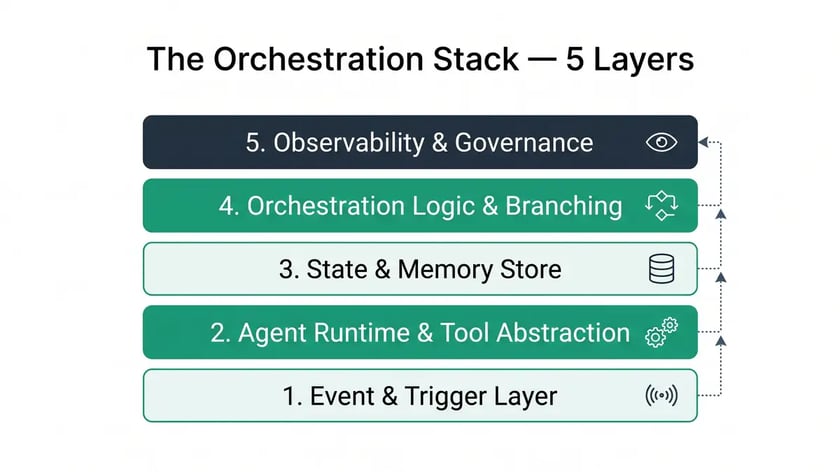
| Layer | What it has to do | How we build it in n8n or Make |
| 1. Trigger | Start once per record, even when a webhook fires twice | Idempotency key (record ID plus event) checked against the state store before step one |
| 2. Steps and tools | Do the work: APIs, enrichment, LLM calls, agents | Native nodes or modules; HTTP for the rest; AI agent nodes for judgment steps |
| 3. State | Know where every record is between runs | A status column in an n8n data table, a Make data store or a CRM property |
| 4. Control logic | Branch, wait, retry, loop back through gates, hand off to humans | IF and Switch nodes, routers, Wait node or a second scenario, approval with timeout |
| 5. Monitoring | Prove the work got done. A finished run proves nothing. | Error workflow plus a daily count check and runtime comparison against the last run |
Layer 3 is where most "orchestration" projects are really still automation. If the only place a record's progress lives is inside a running execution, a crash erases it. Temporal is the extreme version of the fix: its workflows are durable by design and "there is no time constraint on how long a Workflow Execution can run" (Temporal docs). For a B2B ops team without engineers, an explicit status column gets you most of that durability for free.
How do you roll out workflow orchestration in five steps?
Start with one process that has money attached, write its state model before you build, then add monitoring before the second process. McKinsey tested 25 attributes against EBIT impact from generative AI and found that redesigning workflows had the biggest effect, yet only 21% of organizations using gen AI had fundamentally redesigned even some workflows (McKinsey, March 2025, 1,491 respondents). The tool is the easy part.
Pick one process where a quiet failure costs money
Lead to meeting, closed-won to kickoff, renewal risk. Not the most complex process you have. Map it with a workflow audit first.
Write the state model before the first node
List every status a record can have (new, enriched, held, approved, sent, failed) and which step moves it. If you can't write this list, you can't orchestrate the process yet.
Build with retries that can't duplicate
Idempotency key on the trigger, an error workflow on every production workflow, and human approvals with a timeout and a named fallback owner. Our human-in-the-loop guide covers the approval patterns.
Read 15 records end to end before go-live
Don't trust the gate report. Open fifteen outputs and read them as the customer would. Our 18 August read found 11 broken leads out of 18 that had come through every automated gate.
Add a heartbeat, then the next process
A daily check that the expected number of records moved and that runtime is in line with the last run. Only then reuse the pattern for process two.
Where do AI agents fit in an orchestrated workflow?
Treat an AI agent as one step inside the orchestration, with a defined input, a defined output and a status it writes back. Don't let it be the orchestrator of a revenue process. The agent judges. The workflow decides what happens next.
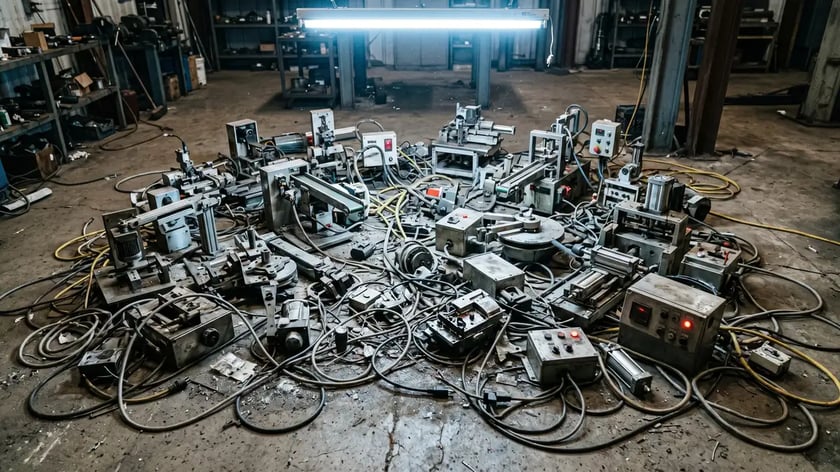
Gartner expects 40% of enterprise applications to include task-specific AI agents by the end of 2026, up from less than 5% in 2025 (Gartner, August 2025). Gartner also predicts that over 40% of agentic AI projects will be canceled by the end of 2027 "due to escalating costs, unclear business value or inadequate risk controls" (Gartner, June 2025).
Both predictions point the same way. Agents bolted onto apps without state, gates and monitoring are the projects that get canceled. Inside an orchestrated workflow, an agent call is just a step with a cost per run, a gate after it and a fallback when it returns nothing useful. The handoff between agent and human is where most of the risk sits, which is why we wrote up our agent handoff protocols separately.
Scalable workflow orchestration comes from that structure. Once the five layers exist for one process, the second process reuses the trigger pattern, the state table and the heartbeat. That's operational workflow orchestration that one ops owner can run.
Frequently asked questions
What is the difference between workflow automation and workflow orchestration?
Workflow automation completes a task with minimal human involvement, such as copying a form fill into a CRM. Workflow orchestration coordinates many automated tasks across systems into one end-to-end process and tracks each record's state through waits, retries, approvals and failures. You need orchestration once a process spans three or more systems, waits for something, or costs money when it fails quietly.
Is n8n good for workflow orchestration?
Yes, if someone technical owns it. n8n bills one execution per workflow run regardless of steps, its Wait node can pause a run for days and resume on a time or webhook, and it can be self-hosted. Paid Cloud plans start at $20 a month for 2,500 executions (annual billing). The catch is that failures can be quiet, so it needs an error workflow and outcome checks.
Can Make handle orchestration?
Yes. Make orchestrates with routers, error-handler routes, subscenarios and data stores. A single scenario run is capped at 40 minutes on paid plans, so multi-day waits have to be split into separate scenarios that share state through a data store. Make bills one credit per module action, so long workflows at high volume cost more than on n8n.
What does workflow orchestration cost?
On the tools, less than most teams expect: n8n Starter is $20 a month for 2,500 executions and Make Core is $9 a month for 10,000 credits on annual billing ($12 billed monthly), while self-hosted n8n costs only the server. The real cost is the owner's time to monitor runs and fix the failures that don't raise an error.
When do you need Temporal or Airflow instead of n8n or Make?
When an engineering team runs processes that must survive crashes over weeks or months with exact replay, Temporal's durable execution is built for that. Airflow, Prefect and Dagster are data pipeline schedulers. For B2B sales and operations processes owned by a small ops team, n8n or Make with an explicit state store is usually enough.
Should an AI agent be the orchestrator?
Not for revenue-critical processes. Use the agent for judgment steps such as classifying a reply or drafting a summary, and let the workflow decide what happens next based on the status the agent writes back. Gartner predicts over 40% of agentic AI projects will be canceled by the end of 2027, mostly over cost, value and risk controls.
Want the chain without the quiet failures?
peppereffect builds and runs orchestrated workflows on n8n and Make for B2B teams: state model, gates, heartbeat and monitoring included, so a green run means the work got done.
Book a Growth Mapping CallSources: IBM, Automation vs orchestration; Forrester, Adaptive Process Orchestration; Temporal, Workflow Execution; n8n pricing; n8n Wait node; Make pricing; Zapier pricing; McKinsey, The state of AI (March 2025); Gartner, August 2025; Gartner, June 2025.