

Most teams compare n8n, Zapier, and Make on features and walk away with the wrong answer. The feature lists look similar. The pricing pages do not, and that is where the real decision lives. These three platforms meter your usage in three fundamentally different units, and that single difference can swing your annual bill by a factor of ten on the exact same workflow.
n8n, Zapier, and Make.com bill in three different units: Zapier charges per task (each successful action step), Make charges per operation or credit (each module run, usually one per data record), and n8n charges per execution (one full workflow run, no matter how many steps it contains). A 10-step workflow run 10,000 times a month costs roughly 100,000 Zapier tasks (about 489 USD), 110,000 Make credits (about 199 USD on Pro), or 10,000 n8n executions (about 50 USD on Pro). Zapier wins on ease and breadth, Make on visual mid-complexity value, and n8n on complex, high-volume, or self-hosted builds where workflow complexity is effectively free.
This is not a feature shoot-out. It is a true cost-of-ownership comparison built for B2B operators who need to know what these platforms actually cost once workflows get real. We will break down each pricing model, run the same workflow through all three, expose the hidden costs, and end with a decision framework. The figures here come from official pricing pages and documentation as of 2026.
The one thing that actually separates them: how they count
Before any price tag matters, you have to understand the billing unit. It is the lever that decides everything else.
Zapier bills per task. A task is one successful action step inside a Zap. If a workflow triggers and then performs five actions, that run consumes five tasks. Zapier does not charge for the trigger itself or for polling that finds nothing, and since 2024 several internal tools such as Filter, Formatter, and Paths no longer count on paid plans. But every external action that completes successfully increments the counter, and AI or code-heavy steps can meter at more than one task each (Zapier Community).
Make bills per operation, now packaged as credits after its 2025 pricing change. A credit is consumed for each module run, typically one per data bundle. The first module in a scenario costs one credit per run, and each downstream module costs a credit for every record it processes. Routers and error handlers like Rollback and Break are free, but everything functional consumes credits, including checks and test runs (Relay.app).

n8n bills per execution. An execution is one full workflow run, and the number of nodes inside it does not matter. A workflow with three nodes and a workflow with thirty nodes each count as one execution. Only production runs started by triggers, schedules, or polling count toward your quota; manual test runs, sub-workflows, and error workflows are excluded entirely (n8n Docs).
Read those three definitions again. Zapier scales cost with the number of actions. Make scales cost with the number of module runs and records. n8n scales cost with the number of times a workflow fires, and treats everything inside that workflow as free. That is the whole ballgame.
The takeaway
The more steps your workflows contain, the more dramatically the three models diverge. Simple two or three-step automations cost roughly the same everywhere. Complex, multi-system workflows are where per-execution pricing pulls far ahead and per-task pricing falls far behind.

What does Zapier actually cost in 2026?
Zapier organizes its pricing into four families: Free, Professional, Team, and Enterprise. The Free plan is permanent at 0 USD a month but caps you at 100 tasks and two-step workflows, and it switches your Zaps off once you hit the cap until the next billing cycle. That makes it fine for experiments and unworkable for anything business-critical (Zapier).
Professional is the entry paid tier at 19.99 USD a month billed annually, after Zapier retired the old Starter plan on 2 April 2024. It unlocks multi-step Zaps and premium apps. The base tier starts around 750 tasks and climbs from there; 2,000 tasks runs roughly 49 USD a month, and 100,000 tasks lands near 489 USD a month (Zapier blog). Team starts at 69 USD a month and adds shared folders and permissions, and Enterprise is custom-quoted with SSO and higher rate limits.
Two cost drivers deserve attention. First, premium connectors such as Salesforce, Shopify, and PayPal require a paid plan, so most serious B2B use cases cannot stay on the free tier even at low volume (Zapier Help). Second, overage is billed pay-per-task at 1.25 times your in-plan task rate, and it is enabled by default. That protects you from Zaps shutting off, but it means undersizing your tier and leaning on overage is the most expensive way to buy tasks (Zapier Community).
Watch the overage trap
Pay-per-task overage at 1.25x sounds like a convenience, and it is, until you realize that consistently running over your tier costs more per task than simply buying the next tier up. If your usage is predictable, size your plan to it. Overage should cover spikes, not baseline load.
What does Make.com actually cost in 2026?
Make moved to a credits model in 2025. The Free plan includes 1,000 credits a month, access to more than 3,000 apps, two active scenarios, and a 15-minute minimum interval between runs. The Core plan starts at 10,000 credits, and scaling Core to 20,000 credits costs about 21 USD a month on an annual plan, which shows how gently the credit slider increases cost (Relay.app).
Pro is where most growing B2B teams land. Pro at 150,000 credits a month is about 199 USD on an annual subscription and unlocks full-text log search, custom variables, and priority execution. The Teams plan supporting 500,000 credits runs about 533 USD a month annually, or 724 USD month-to-month. Make's annual discount is roughly 15 percent, notably smaller than Zapier's 33 percent (Make).
Make's advantage is fine-grained pricing: you get far more operations per dollar than Zapier gives you tasks. The catch is operation inflation. Because every module run consumes a credit, usually one per record, a scenario that fetches 100 items and pushes them through four modules can burn around 400 credits in a single run. Even checks and test runs cost credits. Make is exceptionally powerful for data-heavy pipelines, but those same pipelines are where credit consumption climbs faster than the number of business events would suggest.
Not sure which model fits your actual workflows?
Talk to a growth architectWhat does n8n actually cost in 2026?

n8n splits into two very different cost stories: managed cloud and self-hosted. On n8n Cloud, the Starter plan runs around 20 USD a month billed annually for roughly 2,500 executions, and Pro runs around 50 USD a month for roughly 10,000 executions. A Cloud Pro-2 plan lets you self-serve up to 500,000 monthly executions, charging about 2 currency units per additional 1,000 executions on top of the base subscription (n8n Help Center).
The self-hosted Community Edition carries no per-execution fee at all under n8n's fair-code licence. At high volume this can be dramatically cheaper than any cloud plan, because added workflow volume only consumes incremental server resources. But "no licence fee" is not "free." A production deployment needs a server or container cluster, a database, storage, monitoring, backups, and an engineer's time to patch, secure, and scale it. For a team with existing DevOps capability, that overhead is small relative to the savings. For a small non-technical team, it usually is not. We cover this trade-off in depth in our piece on n8n limitations.
What makes n8n structurally cheap for serious work is that complexity is free. Adding nodes, branches, AI calls, and integrations to a workflow does not raise its execution count. Only firing the workflow more often does. That is the opposite of Zapier, where every added step is another billable task on every single run.
The same workflow, three bills: a worked example

Abstract pricing models are hard to feel. So picture a realistic B2B workflow. A new order is created in your e-commerce platform. The workflow then runs 10 action steps: validate the data, enrich the customer record, update the ERP, post to a messaging app, log to the data warehouse, send an email, update the CRM, create a project task, write to a spreadsheet, and update a dashboard. It runs 10,000 times a month, one order per run.
On Zapier, the trigger is free but each of the 10 actions is a task. That is 100,000 tasks a month, which sits on a Professional tier costing roughly 489 USD. On Make, the trigger module plus 10 action modules is 11 credits per run, so 110,000 credits a month, comfortably inside a Pro 150,000-credit plan at about 199 USD. On n8n, the entire thing is one execution per order, so 10,000 executions a month, which fits a Pro cloud plan around 50 USD. Same business outcome, three very different bills.
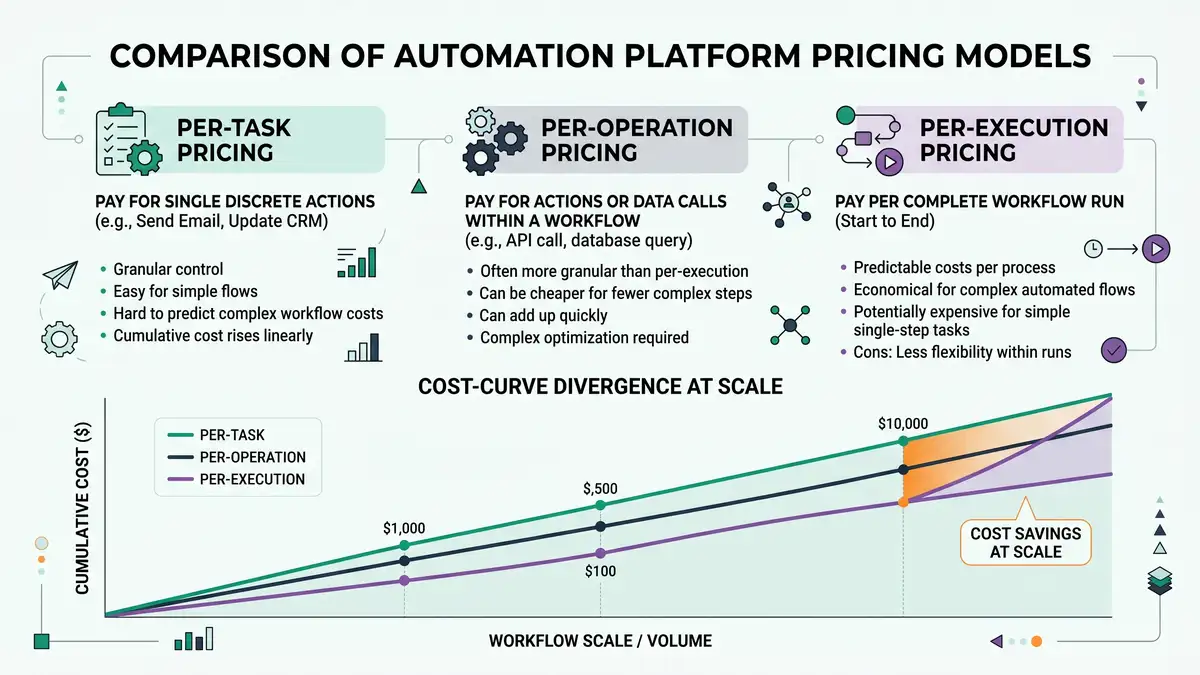
Now double the complexity to 20 steps, same 10,000 runs. Zapier jumps to about 200,000 tasks, pushing the bill toward 700 to 900 USD a month. Make rises to about 210,000 credits, somewhere between its Pro and Teams tiers. n8n does not move at all: still 10,000 executions, still around 50 USD, because the extra 10 steps live inside the same execution. This is the single clearest illustration of why per-execution pricing wins for complex builds and why per-task pricing punishes them.
| Platform | Billing unit | 10-step example / month | Approx. cost |
| Zapier | Per task (each action) | 100,000 tasks | ~489 USD (Professional) |
| Make.com | Per operation / credit | 110,000 credits | ~199 USD (Pro) |
| n8n (Cloud) | Per execution (whole run) | 10,000 executions | ~50 USD (Pro) |
| n8n (self-hosted) | None (fair-code) | Unlimited executions | Infra + DevOps time |
Sources: Zapier, Relay.app / Make, n8n Docs. Figures are 2026 indicative; verify current rates on each vendor's pricing page.
The hidden costs nobody quotes you
Headline prices are only part of the true cost of ownership. Each platform has a quieter cost that shows up later.
Zapier's hidden cost is sprawl and overage. The same ease of use that lets anyone build a Zap also lets every team build overlapping Zaps that quietly duplicate tasks, and pay-per-task overage turns an undersized plan into a creeping monthly surprise. Make's hidden cost is operation inflation: poorly optimized scenarios that iterate over large datasets consume credits far out of proportion to the number of business events, and every test run during development burns credits too. n8n's hidden cost is operational and human: self-hosting demands infrastructure, security, monitoring, and engineering time, and the platform's technical nature means a steeper learning curve before anyone is productive.
The takeaway
Add the quiet costs to the sticker price before you choose. Zapier's true cost rises with workflow complexity and team sprawl, Make's rises with data volume per run, and n8n's rises with the engineering maturity you need to operate it. The cheapest platform on paper is not always the cheapest to own.
Breadth, flexibility, and who each platform is built for
Cost is decisive, but capability and fit still matter. On connector breadth, Zapier leads decisively with more than 9,000 apps, which is the strongest reason to choose it when you depend on long-tail or niche SaaS tools. Make connects more than 3,000 apps with a powerful visual builder. n8n ships fewer prebuilt nodes but its HTTP Request node connects to virtually any REST API, so technical teams can integrate almost anything with configuration.
Those breadth-versus-flexibility trade-offs map cleanly onto who each tool serves. Use the comparison below as a fit test, and see our wider roundup of workflow automation tools for the broader field beyond these three.
| Factor | Zapier | Make.com | n8n |
| Best for | Non-technical teams | Semi-technical builders | Technical / developer teams |
| Integrations | 9,000+ apps | 3,000+ apps | HTTP-any + core nodes |
| Learning curve | Lowest | Moderate | Steepest |
| Cheapest at scale | Rarely | Often | Usually (self-host) |
| Self-hosting | No | No | Yes (fair-code) |
Sources: Zapier, Make, n8n Docs.
The market context reinforces why this decision matters: the workflow automation market is worth about 26.01 billion USD in 2026 and is growing at a 9.41 percent CAGR toward 40.77 billion USD by 2031, so the tool you standardize on now will compound across years of builds (Mordor Intelligence).
How to choose: a decision framework
Match the platform to your volume, complexity, and team, not to a feature checklist.
Choose Zapier when speed and breadth beat cost
You are non-technical, your workflows are simple, your volume is low to moderate, and you need a niche connector that only Zapier has. The premium you pay per task buys you the fastest path to a working automation.
Choose Make when you want visual mid-complexity at lower cost
You have some technical comfort, your workflows branch and transform data, and you want more operations per dollar than Zapier. Just design scenarios to avoid needless iterations that inflate credits.
Choose n8n when complexity and volume are high
You have technical operators, your workflows are deep and multi-system, and you run them often. Per-execution pricing makes complexity free, and self-hosting removes per-run fees entirely if you can carry the DevOps load.
Run a hybrid for the best of both
Use a managed tool like Zapier or Make for commodity SaaS integrations where breadth wins, and run n8n for your high-value, custom, and agentic logic where the complexity-is-free model wins. Concentrate spend where it earns the most leverage.
That hybrid stance is the one we most often architect for clients. It treats automation platforms as components in a system rather than a single tool to bet the business on. If you want help mapping which of your workflows belong on a managed tool and which belong on n8n, that is exactly the kind of decision a platform comparison should resolve before you commit budget.
Stop guessing which platform your automations belong on
We architect AI-powered operating systems that put each workflow on the platform with the lowest true cost of ownership, then build and hand over the system that decouples your growth from headcount. Book a Growth Mapping Call and we will map your highest-leverage automations and the right stack to run them.
Book your Growth Mapping CallFrequently asked questions
Is n8n cheaper than Zapier and Make?
Usually, for complex or high-volume workflows. n8n charges per execution, so a 10-step workflow run 10,000 times a month costs 10,000 executions, around 50 USD on a Pro cloud plan, versus roughly 100,000 tasks on Zapier (about 489 USD) and 110,000 credits on Make (about 199 USD on Pro). For simple, low-volume automations, Zapier's free tier or Make's free 1,000 credits can be cheapest. Self-hosted n8n removes per-run fees but adds infrastructure and DevOps cost.
What is the difference between a Zapier task, a Make operation, and an n8n execution?
A Zapier task is one successful action step, so a five-action workflow uses five tasks per run. A Make credit is one module run, usually one per record, so the same workflow plus its trigger uses about six credits per run. An n8n execution is one full workflow run regardless of node count, so the same workflow uses one execution. This is the biggest driver of cost differences.
How much does Make.com cost compared to Zapier?
Make is generally cheaper per unit of work. Make Pro at 150,000 credits is about 199 USD a month annually, and Teams at 500,000 credits is about 533 USD. Zapier Professional at 100,000 tasks is about 489 USD. Make gives far more fine-grained operations for similar spend, but every module run and even checks and tests consume credits, so data-heavy scenarios can suffer operation inflation. See our full n8n pricing breakdown for the n8n side of the comparison.
Is self-hosted n8n really free?
The Community Edition has no per-execution licence fee under n8n's fair-code licence, but it is not free to run. You pay for infrastructure, database and storage, and the engineering time to deploy, secure, patch, back up, and monitor it. For a team with DevOps capability, self-hosting can be dramatically cheaper at scale. For a small non-technical team, the operational burden often outweighs the saved subscription.
Which automation platform has the most integrations?
Zapier leads with over 9,000 apps, which matters most for long-tail or niche connectors. Make connects more than 3,000 apps. n8n ships fewer prebuilt nodes but its HTTP Request node connects to virtually any REST API. Breadth favours Zapier; flexibility favours n8n. If Zapier is your front-runner, weigh the Zapier alternatives before committing.
Which is best for a B2B team: n8n, Zapier, or Make?
Use Zapier for non-technical teams and the widest connector library when needs are simple. Use Make for visual mid-complexity at lower per-unit cost. Use n8n when you have technical operators and complex, multi-system logic per event, because complexity inside a workflow is effectively free. The strongest setup for many B2B companies is a hybrid: a managed tool for commodity integrations and n8n for high-value custom and agentic logic. total cost of building the automation itself
Resources
- Zapier: Plans and Pricing
- Zapier: Pricing explained (task tiers)
- Zapier Community: pay-per-task overage and pricing changes
- Zapier Help: what is a premium app
- Relay.app: Make.com pricing and credit examples
- Make: apps and AI agents
- n8n Docs: how executions are counted
- n8n Help Center: execution quotas and limits
- Mordor Intelligence: Workflow Automation Market