

Search "AI automation tools" and you get a wall of listicles ranking fifty products with no logic and no opinion. Almost none show what the same workflow costs on each platform, which is the number that decides your bill. This is the version a B2B operator needs: the categories that matter, how each platform meters you, what the same workflow costs under each billing model, and the failure modes that only appear in production.
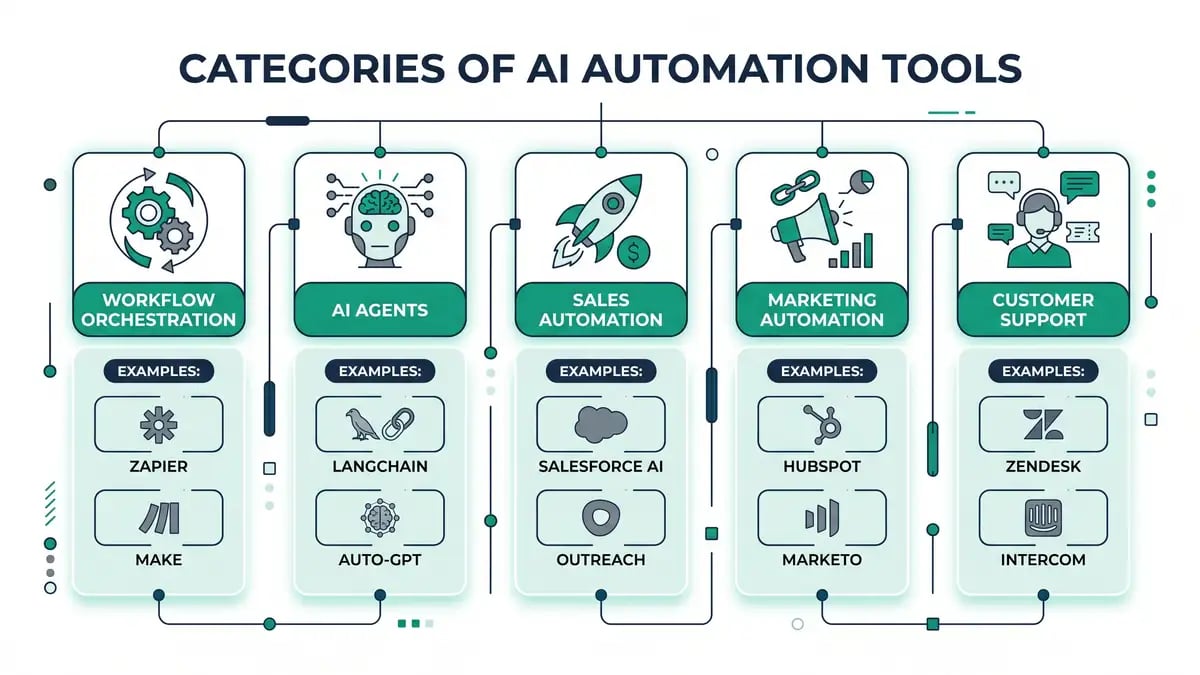
AI automation tools fall into six categories: workflow orchestration (Zapier, Make, n8n, Power Automate), AI agent builders, sales and prospecting, marketing, customer support, and enterprise RPA. Feature lists rarely decide the outcome. The metering unit does. A workflow with ten billable steps costs ten tasks on Zapier, ten credits on Make and one execution on n8n, so an entry tier of USD 12 to EUR 20 covers roughly 75, 1,000 or 2,500 runs a month depending on which model you signed. Choose the metering unit that matches how your workflows actually run, then check whether the platform can grow into agents without a re-platform.
This is a category-by-category buyer's guide with a working cost model, not a ranking. Every price was read from the vendor's own pricing page on 25 September 2026. Every analyst figure links to the primary release.
What counts as an AI automation tool in 2026
An AI automation tool is software that runs a business process with little or no human input, using AI for the parts a fixed rule cannot handle. The useful line is between deterministic automation and AI automation. Traditional automation and RPA follow rules: if this, then that. AI automation adds judgement, reads unstructured input like emails and PDFs, and at the far end operates as agents that plan and execute multi-step work.
Gartner puts the inflection in 2028, predicting that 33 percent of enterprise software applications will include agentic AI, up from less than 1 percent in 2024, and that at least 15 percent of day-to-day work decisions will be made autonomously, up from none in 2024 (Gartner, 25 June 2025). A nearer-term forecast puts 40 percent of enterprise applications integrated with task-specific AI agents by the end of 2026, up from less than 5 percent (Gartner, 26 August 2025). For the underlying distinction, see our guide to agentic workflows.
One caveat belongs at the top rather than buried at the bottom. In the same release, Gartner estimates that only around 130 of the thousands of vendors describing themselves as agentic actually are, and names the practice: agent washing, rebranding existing assistants, RPA and chatbots as agents without the underlying capability. When you evaluate this category, assume the label is marketing until a trial proves otherwise.
The billing model decides your cost, not the feature list
The single most consequential difference between orchestration platforms is the unit they charge for. Zapier bills per task, where each completed action consumes quota. Make bills per credit, where each module action counts. n8n bills per execution, where one whole workflow run counts once regardless of how many steps it contains. That one distinction moves your bill by more than an order of magnitude.
The arithmetic, from the vendors' own pricing pages on 25 September 2026. Zapier Professional is USD 19.99 a month for 750 tasks, Make Core is USD 12 for 10,000 credits, and n8n Starter is EUR 20 for 2,500 executions. Run a workflow with ten billable action steps and those tiers buy 75, 1,000 and 2,500 runs.
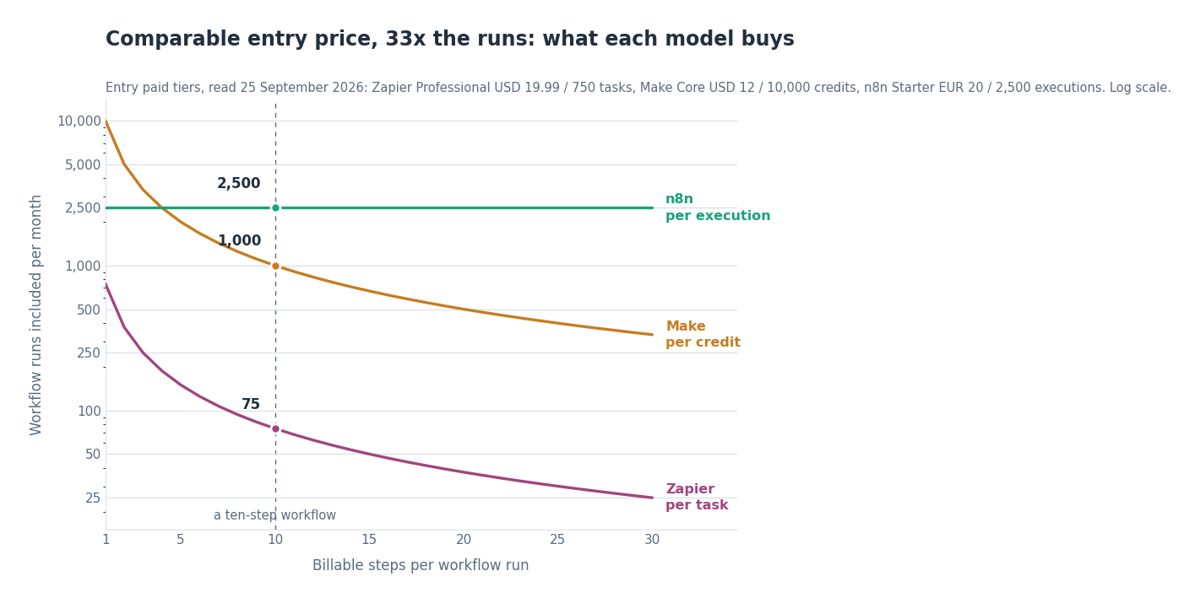
The shape of that chart is the argument. Per-task and per-credit lines fall in proportion to step count, because the divisor is your workflow's complexity. The per-execution line is flat, because complexity is not a billable dimension. A tool that looks cheapest on a three-step trial can be the dearest platform you own once that automation grows to twenty steps. Workflows always grow.
| Billable steps per run | Zapier Professional, USD 19.99 | Make Core, USD 12 | n8n Starter, EUR 20 |
| 3 steps | 250 runs | 3,333 runs | 2,500 runs |
| 10 steps | 75 runs | 1,000 runs | 2,500 runs |
| 25 steps | 30 runs | 400 runs | 2,500 runs |
Runs included per month at each platform's entry paid tier. Sources, all read 25 September 2026: Zapier pricing, Make pricing, n8n pricing. Zapier does not bill triggers or filters, so a ten-action workflow consumes ten tasks.
Model your own volume before you sign anything
Enter your runs per month and steps per run. The model returns what the same workflow costs under per-task, per-credit, per-execution and outcome billing. It runs in your browser and sends nothing anywhere.
The takeaway
Pick your orchestration layer on the metering unit, not the connector count. Below roughly 100 runs a month with short workflows, the per-task model is fine and Zapier's catalogue wins on speed. Above that, or once workflows exceed about five steps, per-credit and per-execution models pull away hard. This one choice compounds across every automation you later build on top of it.
Workflow orchestration tools: the layer everything else sits on
Orchestration platforms connect your apps and run multi-step automations, and they are the foundation most B2B automation is built on. The platforms that matter split by who they are for rather than by feature parity.

Microsoft Power Automate prices differently again: USD 15 per user a month for Premium, USD 150 per bot for unattended desktop RPA, and USD 215 per bot hosted (Microsoft, read 25 September 2026). Workato and comparable enterprise platforms price on custom contracts with a high floor, bought for governance rather than unit economics. Activepieces and other open-source options give full control at no licence cost, for teams willing to run infrastructure.
| Platform | What it meters | Entry price | Best for |
| Zapier | Per task, each completed action | Free 100 tasks; USD 19.99 Professional | Fastest no-code start, widest connector catalogue |
| Make | Per credit, each module action | Free 1,000 credits; USD 12 Core | Visual multi-step work at mid volume |
| n8n | Per execution, one whole run | Free self-hosted; EUR 20 Starter | Technical teams, agents, cost at scale |
| Power Automate | Per user or per bot | USD 15 per user; USD 150 per bot | Microsoft 365 estates, desktop RPA |
| Zendesk AI | Per automated resolution | Seats from USD 19 per agent | Support deflection billed on outcomes |
| Intercom Fin | Per resolved outcome | From USD 0.99 per outcome | Support teams that can measure deflection |
All figures read from each vendor's own pricing page on 25 September 2026. Workato and comparable enterprise platforms publish no entry price and are quoted per contract.
Two practical notes the comparison pages leave out. Self-hosting n8n's Community Edition carries no licence fee, which changes the calculation entirely once you have somewhere to run it. And per-seat or per-bot models like Power Automate's are predictable in a way usage models are not, which finance teams often pay a premium for on purpose. We go deeper in n8n vs Zapier vs Make and the n8n pricing breakdown, with the platform itself covered in our n8n review.
The trap in every comparison table
Published tiers describe a steady state that automation rarely has. Retries on failure consume quota twice. Polling triggers fire on a schedule whether or not there is work to do. Loops multiply step count at runtime, so a "ten-step" workflow that iterates over forty records is four hundred billable steps on a per-task plan. Model the worst month, not the brochure month.
AI agent builders: the fastest-growing and least proven category
Agent builders let you configure systems that plan, decide and act across several steps rather than firing a fixed sequence per trigger. n8n and Make ship agent capability on top of their orchestration engines, Copilot Studio targets the Microsoft stack, and the model vendors sell agent tooling metered per token. This is where the category is heading and where the evidence is thinnest.
Gartner's forecast for this segment is unusually blunt: over 40 percent of agentic AI projects will be cancelled by the end of 2027, with escalating costs, unclear business value and inadequate risk controls named as the causes (Gartner, 25 June 2025). The same release reports a January 2025 poll of 3,412 attendees in which 19 percent had made significant agentic investments, 42 percent conservative ones, and 31 percent were waiting to see. Appetite is broad. Conviction is not.
Longer term the economics shift rather than disappear. Gartner now estimates that USD 234 billion of enterprise application spending is exposed to agentic arbitrage by 2030, roughly 20 percent of enterprise application SaaS spend, as agents complete work across systems and make the interface irrelevant (Gartner, 1 July 2026). For a buyer today that argues for platforms that can grow into agents, and against long contracts on tools that cannot. Our guides to n8n AI agents and no-code AI agents cover how to build them with guardrails.
Sales, marketing and support tools, and the quiet move to outcome billing

Function-specific tools embed AI into a workflow your team already runs, so they pay back faster than a blank orchestration canvas. In sales, Clay and Apollo lead on enrichment while HubSpot folds AI across the CRM, priced per seat. Marketing follows the same logic. The change worth noticing is in support, where the billing unit has moved.
Zendesk now bills AI agents on automated resolutions, charging for requests the AI resolved without escalating to a person, alongside seat pricing that starts at USD 19 per agent a month for Support Team and USD 55 for Suite Team (Zendesk, read 25 September 2026). Intercom prices Fin from USD 0.99 per resolved outcome, on top of seats from USD 29 (Intercom, read 25 September 2026). Two of the largest vendors in the category now charge for results rather than access.
Outcome pricing is better aligned than seats, and it carries its own risk: it only beats seats while the deflection rate stays high, and if resolution quality drops and tickets bounce back to humans you pay twice. Measure deflection monthly. Across all three functions a point tool automates one task, and the leverage comes from wiring them together, which is the job of the orchestration layer and of AI workflow automation done as a system.
AI assistants belong in the stack, and in the governance policy
General assistants such as ChatGPT, Claude, Gemini and Copilot are the most widely deployed AI tools in most B2B companies, usually without appearing on any automation budget line. They earn their place. They also create one exposure no orchestration platform introduces, because staff adopt them individually rather than through procurement.

S&P Global Market Intelligence measured the split directly. In its Workforce Productivity and Collaboration study of 589 respondents fielded in late 2024, just 42 percent lacked access to AI assistants or agents at all; among the rest, 26 percent used stand-alone tools provided by their employer, 26 percent used AI built into existing software, and 19 percent were using unsanctioned tools (S&P Global Market Intelligence, 27 October 2025). Roughly one in five people were putting company work into tools nobody had approved.
A ban pushes usage further into the dark. Give people a sanctioned tool that is at least as good, write down which data classes may go into which tool, and check adoption rather than assuming it. Our AI governance framework for B2B sets out the policy shape. Choose the assistant on the workflows that will consume most of the usage and the systems it must reach, not on benchmark leaderboards, which reorder every few months while your integration requirements do not.
Five ways automation breaks in production, from our own build log
Every vendor page describes the happy path. These five failures come from peppereffect's own production systems, where automations run daily against live client data. Each cost real time before it was understood, and none appears in a comparison table.
The pipeline that fails silently after an API write
Rewriting a live workflow through a platform's API stripped the credential blocks on read and did not reassign them on write. The mail nodes came back without credentials and the chain reported success while sending nothing. Read and execute through the API freely. Treat a write as safe only after proving no node carries a credential.
Green runs with empty output
A workflow's runtime fell from 24 seconds to 1.4 seconds and the platform kept reporting success. The LLM key behind it had expired, so every AI step returned nothing instantly. The chain ran green and empty for half an hour. Alert on runtime deviation against the previous run, not only on error status.
Hard timeouts that cap bulk work
Code execution aborts hard at five minutes on the platform we run. Any bulk job therefore has to be capped per pass and restarted, which is a design constraint rather than a bug. Ask every shortlisted vendor for the hard execution ceiling before you design a batch process around it.
Execution logs that eat the run
A generic HTTP request node writes every fetched page into the execution log. At around 1,500 pages the memory filled and the run crashed. The tool was working exactly as documented. Check what your platform persists per step before pointing it at anything high volume.
Hidden caps that look like process problems
A constant buried in workflow code limited processing to the first 450 ranked records out of 749, so everything past that point was invisible downstream. The backlog looked like a capacity problem for days. It was a filter. When throughput is inexplicably flat, read the code before re-planning the process.
Source: peppereffect production build log, 2026. Modes 1, 3 and 4 are platform behaviours working as documented; modes 2 and 5 were our own configuration. In every case the surprise was the consequence, not the behaviour.
How to choose your AI automation tools

Tool choice is necessary and nowhere near sufficient. S&P Global Market Intelligence found the proportion of companies abandoning most AI initiatives before production rose from 17 percent to 42 percent, with the average organisation scrapping 46 percent of its proof-of-concept projects. The figures come from a survey of 1,006 respondents fielded October to November 2024, published October 2025 (S&P Global Market Intelligence). Budget limits and confidence in accuracy led the obstacles, each named by 29 percent. Four gates keep you out of that group.
Name the process before the tool
Pick two or three high-frequency processes that will absorb most of the usage and document each one: inputs, steps, outputs, current time cost, error rate. A use case phrased as "make us more efficient" is not yet a problem worth automating, and it is the most common reason a licence goes unused. If you are deciding which teams to automate first, our guide to decoupling revenue from headcount ranks the roles and runs the hire-or-system math.
Model the metering at your worst month
Take real runs per month and real steps per run, including retries and loop iterations, then compare per-task, per-credit, per-execution and per-seat costs. Our cost model does this in about a minute. The number to protect is cost per run at twelve months of growth, not the sticker price today.
Check the agent ceiling and the data floor
Ask whether the platform can grow from rules into agents, and whether it can keep data on infrastructure you control if a client or regulator requires it. A tool that caps out at simple rules means re-platforming within a year, and re-platforming costs more than the licence ever did.
Define the measurement before the pilot
Not "it feels faster" but "first response time falls from four hours to forty-five minutes." Set the metric before the trial starts, run a 30-day parallel test against your top two candidates, and give one named person ownership. Clean inputs, a named owner and approval gates on anything that touches a customer or moves money.
Key takeaway
The tools are commodities. The system is the moat. Choosing on metering rather than features, wiring the tools to real data, and sequencing automations so they compound is where the return comes from. That is what an automation partner earns its fee on, measured in genuine automation ROI rather than another subscription. If you want the arithmetic behind a build decision first, start with what AI automation actually costs and why AI projects fail.
Stop collecting tools. Start building the system.
peppereffect selects, integrates and operates AI automation tools as one system, matched to your processes, your volume and your data rules. We pick the tools that win on your numbers, wire them together, and add the guardrails that keep them running when something upstream breaks.
Frequently asked questions
What are AI automation tools?
AI automation tools are software that runs business processes with little or no human input, using AI for the parts a fixed rule cannot handle. They span workflow orchestration (Zapier, Make, n8n, Power Automate), AI agent builders, sales and prospecting tools, marketing automation, customer support automation, and enterprise RPA. The difference from traditional automation is that AI tools handle judgement and unstructured data, and increasingly act as agents that plan and execute multi-step work rather than following fixed rules.
How much do AI automation tools cost in 2026?
Entry paid tiers cluster around USD 12 to 20 a month, but the metering unit decides the real bill. Zapier Professional is USD 19.99 for 750 tasks, Make Core is USD 12 for 10,000 credits, and n8n Starter is EUR 20 for 2,500 executions, all read on 25 September 2026. On a workflow with ten billable steps that same money covers about 75, 1,000 and 2,500 runs respectively, because per-task and per-credit models bill each step while per-execution models bill the whole run once.
Which AI automation tool is cheapest at scale?
For multi-step, high-volume workflows, per-execution billing is usually cheapest, and self-hosting an open-source platform such as n8n's Community Edition removes the licence cost entirely in exchange for running the infrastructure. For short, low-volume automations the difference is small and the per-task platforms win on setup speed and connector coverage. peppereffect's rule of thumb: below about 100 runs a month with short workflows, optimise for speed; above that, optimise for the metering unit.
Are AI agents worth deploying yet?
Selectively. Gartner predicts over 40 percent of agentic AI projects will be cancelled by the end of 2027 on escalating costs, unclear business value and inadequate risk controls, and estimates only around 130 of the thousands of self-described agentic vendors genuinely are. Choose platforms that can grow into agents, pilot on one narrow process with human approval on anything that touches a customer, and treat the agentic label as a claim to be tested.
Why do AI automation projects fail?
Usually not because of the tool. S&P Global Market Intelligence found the share of companies abandoning most AI initiatives before production rose from 17 percent to 42 percent, with budget limits and confidence in accuracy the leading obstacles at 29 percent each. In peppereffect's own production work the recurring causes are silent failures that report success, undocumented processes automated as-is, and metering assumptions that fell apart once retries and loops were counted.
Do you need to code to use AI automation tools?
No. Zapier, Make and Power Automate are built for non-developers, and n8n can be used without code although it rewards a semi-technical user. Self-hosted and open-source options need someone comfortable running infrastructure. Match the tool's technical demand to the team you actually have rather than the one you plan to hire, and start from templates to shorten the learning curve.
What is the difference between AI automation and traditional automation?
Traditional automation and RPA follow fixed, deterministic rules. AI automation adds judgement, handles unstructured data such as emails and documents, and increasingly uses agentic systems that plan multi-step work, decide, and act with minimal supervision. Gartner expects 33 percent of enterprise software applications to include agentic AI by 2028, up from less than 1 percent in 2024, which is why the ability to grow into agents now belongs in the selection criteria.
Resources
- Gartner, 25 June 2025: Over 40% of agentic AI projects will be canceled by end of 2027
- Gartner, 26 August 2025: 40% of enterprise apps will feature task-specific AI agents by 2026
- Gartner, 1 July 2026: USD 234 billion in enterprise application software spend at risk from agentic AI
- S&P Global Market Intelligence, 27 October 2025: Generative AI shows rapid growth but yields mixed results
- Zapier: Pricing and task definition
- Make: Pricing and credit definition
- n8n: Pricing and execution definition
- Microsoft: Power Automate pricing
- Zendesk: Pricing and automated resolutions
- Intercom: Fin per-outcome pricing
- peppereffect: AI automation cost model
- peppereffect: Workflow orchestration playbook
- peppereffect: Marketing infrastructure architecture