

What is a no-code AI agent?
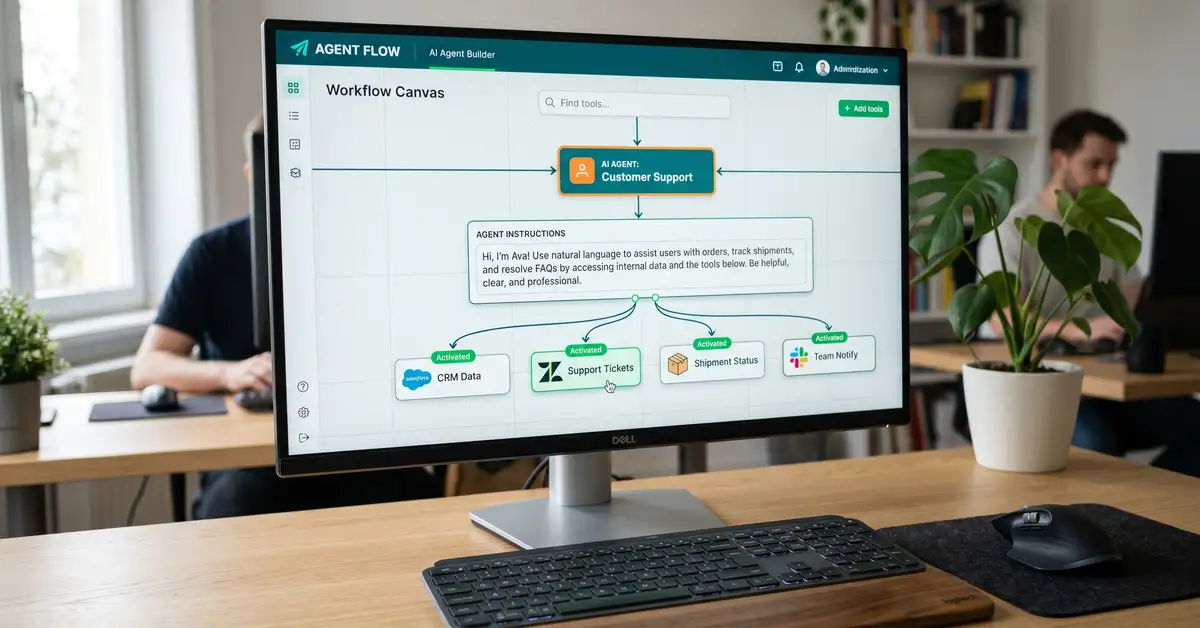
A no-code AI agent is an AI agent you build through a visual interface instead of writing code: you give a language model a goal, some instructions, a memory, and a set of tools, and it decides how to use them to get the job done. The "no-code" part means you assemble it by dragging blocks, filling in fields, and writing plain-English instructions, not by programming. The "agent" part is what separates it from a chatbot. A chatbot answers. An agent acts: it reasons about a goal, chooses which tool to call, takes the action, checks the result, and repeats until the task is finished (Microsoft, 2026).
This matters because building agents used to require engineers. In 2026 it often does not. The AI agents market was worth around 10.9 billion dollars in 2026 and is projected to reach 182.9 billion by 2033, a compound growth rate near 50 percent (Grand View Research, 2026). No-code builders are a big reason that growth is reaching businesses without development teams. If you are new to this space, our guide to n8n AI agents covers the technical version of the same idea.
What you'll learn in this guide:
- How a no-code AI agent works, explained simply
- The leading no-code agent platforms and what they cost
- What you can build without engineers, with real examples
- How to build one step by step, no code
- The limits of no-code and when you actually need a developer
Key Takeaway
No-code does not mean no thinking. The tools handle the programming, but you still design the agent: its goal, its instructions, its tools, and its guardrails. The skill that matters now is clear thinking about process, not syntax.

How a no-code AI agent works
Strip away the interface and every agent is the same five parts. Once you can name them, the builder stops looking intimidating.

A trigger starts the agent: a chat message, a schedule, a form submission, or an event in another app. The model is the brain, a language model like Anthropic's Claude, OpenAI's GPT, or Google Gemini, that you simply select from a menu. The instructions, also called the system prompt, tell the agent who it is and what rules to follow, written in plain English. The memory gives it context, so it remembers earlier steps in a conversation. And the tools are its hands: the apps and actions it can use, from sending an email to updating a CRM. When the agent needs to answer from your own documents rather than guess, you add retrieval augmented generation, or RAG, which lets it look up your content before responding (NVIDIA, 2026).
Key Takeaway
Trigger, model, instructions, memory, tools. A no-code builder just gives you a friendly way to assemble those five. If you can describe a task to a new assistant in writing, you can configure an agent to do it.
The leading no-code AI agent platforms in 2026
The platforms split into three rough groups: visual automation tools that now build agents, agent-native assistants, and the AI vendors' own builders. Here are the names that matter, with how each bills you and where it fits.
| Platform | Entry price | Best for |
| n8n | Free self-host; cloud from $20/mo | Flexibility, 400+ tools, data control, AI agents |
| Make.com | Free; paid from $9/mo | Visual multi-step agents at mid volume |
| Zapier Agents | From $19.99/mo | Widest app catalogue, easiest start |
| Lindy | Free; paid from $49.99/mo | Inbox, meeting, and assistant agents |
| Gumloop | Free tier; usage-based | Drag-and-drop content and ops agents |
| Copilot Studio | Usage-based messages | Agents inside Microsoft 365 |
Sources: n8n, Make, Zapier Agents, Lindy (2026 pricing pages).
n8n stands out when you want real flexibility, hundreds of tools, AI agents, and the option to self-host for data control, while staying usable without code. Relevance AI and Stack AI target teams building multiple agents or "AI teams." The AI vendors themselves offer no-code routes too: OpenAI's custom GPTs and Anthropic's Claude can be configured as simple agents without programming. For a wider view of the automation platforms these sit among, see our roundup of the best workflow automation tools and our n8n vs Zapier comparison.
The honest way to choose between them is to weigh three things against each other: ease of setup, flexibility, and data control. The agent-native assistants like Lindy and Gumloop win on speed to a first working agent. The visual automation tools like Make and Zapier win on the breadth of apps they already connect. And n8n wins when you need to own the whole thing, run it on your own infrastructure, and grow it from a simple agent into a full system without hitting a ceiling. Most businesses are best served starting with whichever matches their immediate need, then consolidating as their ambitions grow. Our guide to the best n8n alternatives maps the trade-offs across the field.
What you can build without engineers
These are agents real businesses build with no code, with the apps involved and the outcome. Each starts from a template or a blank agent and is configured, not programmed.
| Agent | What it does | Connects |
| Customer support agent | Answers from your knowledge base, escalates the rest | Help docs, chat, ticketing |
| Lead qualification agent | Researches and scores inbound leads, updates the CRM | CRM, enrichment, email |
| Research agent | Gathers and summarises sources on a topic on demand | Web, docs, LLM |
| Content drafting agent | Drafts posts or replies for a human to approve | Social, email, LLM |
| Meeting-notes agent | Turns a call transcript into notes and follow-up tasks | Calendar, notes, tasks |
| Inbox assistant agent | Triages email, drafts replies, books meetings | Email, calendar |
Sources: Fellow, Lindy, n8n (2026).

The support agent and the inbox assistant are the two most businesses build first, because they attack high-volume, repetitive work and pay back quickly. Start with one, prove it, then expand. Our library of n8n templates includes many of these as importable starting points.
Wondering what a production agent really costs once it is running?
Read the cost breakdownHow to build a no-code AI agent, step by step
The process is the same on almost any platform, and none of it requires code. Follow these steps and resist the urge to make the first agent clever.
Pick one painful, repetitive task
Choose a single job with a clear trigger and a clear outcome. Narrow beats ambitious for your first agent.
Choose a platform and write the instructions
Pick a builder that fits your apps and skill level, then write the system prompt in plain English: the agent's role, its rules, and what good looks like.
Connect its tools and data
Give the agent the apps it needs and, if it must answer from your content, point it at your documents with RAG. Use your own credentials.
Test, add a guardrail, then deploy
Run it against real inputs, add a human approval step for anything irreversible, and only then switch it on. Widen its autonomy as you trust it.

Many platforms now include an AI builder that generates a starter agent from a plain-English description, which shortens step two even further. The discipline that separates a useful agent from a liability is not technical, it is testing and guardrails. For where agents sit in a bigger automation strategy, see our workflow orchestration playbook.
What it costs to run a no-code AI agent
No-code does not mean no cost. You pay in one or both of two ways: a platform subscription, and the language model's usage. Model choice is the main lever. Efficient models like Anthropic's Claude Haiku cost around a dollar per million input tokens, while more capable models cost several times more (Anthropic, 2026). Some platforms bundle model usage into a credit or task price, others bill it separately. A simple agent might cost tens of dollars a month, a busy production agent considerably more.
If data control matters, self-hosting an open-source tool like n8n removes platform fees and keeps everything on your own infrastructure, in exchange for managing the server. The cost discipline is the same as any automation: route simple steps to a cheap model, and reserve an expensive one for the hard reasoning. Our cost to build an AI agent guide has the full numbers.
The limits of no-code, and when you need a developer
No-code is a brilliant starting point, but it is not always the finish line. You will hit its edges when a project needs complex or unusual integrations, bespoke logic the builder cannot express, very high reliability and scale, strict security and compliance, or deep customisation. At that point a developer, or a partner who builds these systems, earns their keep. The smart move is to prototype in no-code to prove the value, then decide whether to harden it with code or rebuild it properly.

Watch Out
A no-code AI agent takes real actions, so a bad decision has real consequences. Before letting one run unattended: add human-in-the-loop approval for anything irreversible (Permit.io), give each tool the narrowest permissions it needs, and test against real inputs first. Treat an agent like a new hire with system access, not a gadget.
No-code gets you started. A system gets you free.
A no-code agent automates a task. peppereffect architects the autonomous, logic-gated AI agent systems that automate your whole operation, on n8n and beyond, so your revenue decouples from headcount. We design the agents, install the guardrails, and hand you a machine that runs without you.
Book a Growth Mapping CallFrequently asked questions about no-code AI agents
What is a no-code AI agent? A no-code AI agent is an AI agent built through a visual interface rather than by programming. You give a language model a goal, written instructions, a memory, and a set of tools, and it decides how to use them to complete a task. Unlike a chatbot, which only answers, an agent takes real actions across your apps, looping until the job is done.
Can you really build an AI agent without coding? Yes. Platforms like n8n, Make, Zapier, Lindy, and Microsoft Copilot Studio let you build working agents by dragging blocks, selecting a model, and writing plain-English instructions. You still design the agent's logic, connect its tools, and set its guardrails, but you do not write code. Complex or high-scale projects may still need a developer later.
What is the best no-code AI agent platform? There is no single best, only a best fit. n8n suits teams wanting flexibility, many tools, and self-hosting for data control. Zapier is easiest with the widest app catalogue, Make is strong for visual multi-step agents, and Lindy is built for inbox and assistant agents. Microsoft Copilot Studio fits organisations inside Microsoft 365. Choose based on your apps, skill level, and data needs.
How much do no-code AI agents cost? You pay a platform subscription, the language model's token usage, or both. Entry plans start free or from around 9 to 50 dollars a month, while production agents cost more. Model choice drives the usage cost, with efficient models like Claude Haiku costing about a dollar per million input tokens. Self-hosting an open-source tool removes platform fees in exchange for managing your own server.
What can a no-code AI agent do? Common builds include customer support agents that answer from a knowledge base, lead qualification agents that score and update the CRM, research and summarisation agents, content drafting agents, meeting-notes agents that create follow-up tasks, and inbox assistants that triage email and book meetings. Any repetitive, rules-based job with clear inputs is a candidate.
When do I need a developer instead of no-code? Bring in a developer when the agent needs complex or unusual integrations, custom logic the builder cannot express, very high reliability and scale, strict security and compliance, or deep customisation. No-code is the right way to prototype and prove value quickly, but some production systems need to be hardened with code or rebuilt properly afterwards. map the process before automating agentic AI vs traditional automation how to build an AI agent
Resources
- Grand View Research AI Agents Market: market size and growth.
- n8n AI Agents: building agents with a visual, self-hostable tool.
- Zapier Agents: no-code agents on the widest app catalogue.
- Lindy Pricing: agent-native assistant plans.
- Human-in-the-Loop for AI Agents: guardrail best practices.