

The pitch for self-hosting n8n is simple: unlimited workflow executions for the price of a cheap server, your data staying on infrastructure you control, and no vendor metering your every run. The catch is equally simple: the moment you self-host, security, updates, and backups become your job. This guide covers both sides with real 2026 numbers, the exact Docker setup n8n recommends, the security steps that actually matter, and a clear answer to whether you should self-host at all.
Self-hosting n8n means running the free Community Edition on your own infrastructure under the Sustainable Use License. You get unlimited executions and full data control for 3 to 8 USD a month on managed one-click hosting, or about 4.51 EUR on a raw VPS, versus n8n Cloud Starter at roughly 20 USD a month capped at 2,500 executions. Docker is the recommended install method. The trade-off is that you own security, updates, and backups, and the single most important rule is to set and protect your encryption key. Self-host for volume, cost, and data residency; use Cloud for a no-ops start.
This is a technical decision with real economics behind it, so it is treated as one. Every figure is sourced.
What self-hosting n8n actually means
n8n is a fair-code workflow automation platform, and self-hosting means running its free Community Edition on infrastructure you control rather than using the managed n8n Cloud service. Critically, the self-hosted Community Edition uses the same core codebase as Cloud, so you are not running a stripped-down fork; you get the visual editor, the integrations, code nodes, and execution engine in full (n8n hosting docs). Registering your instance with an email even unlocks folders and in-editor debugging at no cost, and a Business or Enterprise licence key applied to the same install adds SSO, multiple environments, and Git version control (n8n docs). If you are new to the platform, start with our primer on what n8n is.

The licensing is the part most teams get nervous about, usually without reason. The Sustainable Use License grants the free right to use, modify, and redistribute n8n for internal business purposes (n8n Sustainable Use License). Automating your own company's processes, building custom nodes for your own product, and even running a consultancy that builds n8n workflows for clients are all explicitly allowed. You only need a separate commercial agreement if you white-label n8n, resell access to it, or host it and charge customers a fee to use it. For the overwhelming majority of B2B operators, self-hosting for internal automation is fully covered by the free licence.
The takeaway
Self-hosted Community Edition is the full product, not a trial. The free Sustainable Use License covers virtually every internal business use, including consulting. You assume ownership of the running application, its database, and the network perimeter, which is exactly the trade you are making in exchange for unlimited executions and data control.
Why self-host: the cost and control case
The headline reason is execution economics. n8n Cloud meters monthly runs, with Starter capped at 2,500 executions and Pro at 10,000, while self-hosted Community Edition has no execution limit beyond what your server can handle (ExpressTech). That gap matters faster than most teams expect. A single workflow triggered every five minutes generates 8,640 executions a month, exhausting the Starter plan in roughly nine days; even a modest set of four workflows can produce around 7,020 executions and force an upgrade to Pro (ExpressTech). On a self-hosted box, those runs cost nothing extra.

The numbers compound into real savings. ExpressTech estimates that a single developer running moderate automation saves 636 to 684 USD a year by self-hosting versus n8n Cloud Pro, and the gap widens for teams (ExpressTech). For the full pricing picture across tiers, see our breakdown of n8n pricing, and for how the execution model compares to task billing, our n8n vs Zapier and Make.com pricing guides. Properly counted, this is one of the clearest automation ROI wins available.
The second reason is data control. Because workflows, credentials, and execution logs all live on infrastructure you choose, you can keep personal data inside an EU data centre for GDPR, or on-premise for stricter regimes, and data never traverses a third-party SaaS unless a workflow explicitly sends it there (n8n hosting docs). Managed providers reinforce this, noting that self-hosting gives full data control unlike SaaS tools that store your credentials on their servers (InstaPods). Add full customization, custom nodes, and freedom from vendor lock-in, and the case for technical teams is strong.
What it costs to self-host n8n in 2026
Self-hosting splits into three cost tiers. Managed one-click hosting is the lowest-effort option: InstaPods runs n8n from 3 USD a month on Launch or 7 USD on Build (1 vCPU, 1 GB RAM, HTTPS, custom domain, SSH, unlimited executions), and PikaPods starts around 3.80 USD, both with no per-task fees and updates, SSL, and backups handled for you (InstaPods, ExpressTech). A raw VPS such as a Hetzner CX22 runs about 4.51 EUR a month with Docker, giving full control in exchange for managing updates, SSL, and backups yourself. Self-hosted PaaS layers like Coolify, CapRover, and Dokploy are free software on a roughly 6 USD VPS, about 72 USD a year, adding GUI deploys and automatic SSL (Server Compass).
| Option | Cost (2026) | Effort and notes |
| Managed one-click (InstaPods, PikaPods) | $3-8/mo | Lowest effort; HTTPS, updates, backups handled; unlimited executions |
| Raw VPS + Docker (Hetzner CX22) | ~EUR 4.51/mo | Full control; you manage OS, updates, SSL, backups, firewall |
| Self-hosted PaaS (Coolify on VPS) | $5-8/mo | GUI deploys, auto SSL; ~72 USD/yr; PaaS uses 200-500 MB RAM |
| n8n Cloud Starter / Pro | $20-60/mo | No-ops, but capped at 2,500 / 10,000 executions per month |
Sources: InstaPods, ExpressTech, Server Compass, n8n.
Want this built and secured for you, not just explained?
Talk to an automation architectHow to self-host n8n with Docker
n8n recommends Docker as the primary installation method because it provides a clean, isolated environment and avoids operating-system and tooling conflicts (n8n Docker docs). Install Docker (Docker Desktop bundles the engine and Compose on Mac, Windows, and Linux), then create a named volume for persistence and run the official image. The canonical command from the docs looks like this:
docker volume create n8n_data
docker run -it --rm \
  --name n8n \
  -p 5678:5678 \
  -e GENERIC_TIMEZONE="Europe/Berlin" \
  -e TZ="Europe/Berlin" \
  -e N8N_ENFORCE_SETTINGS_FILE_PERMISSIONS=true \
  -e N8N_RUNNERS_ENABLED=true \
  -v n8n_data:/home/node/.n8n \
  docker.n8n.io/n8nio/n8n
That brings n8n up at http://localhost:5678 for first configuration (n8n Docker docs). For production, n8n recommends Docker Compose to orchestrate n8n alongside a database, and updates are handled cleanly with docker compose pull, docker compose down, then docker compose up -d. The four moves below take you from a bare server to a production-ready instance. If you would rather not write any of this, our guides to n8n templates and no-code AI agents show what you can build once it is running.
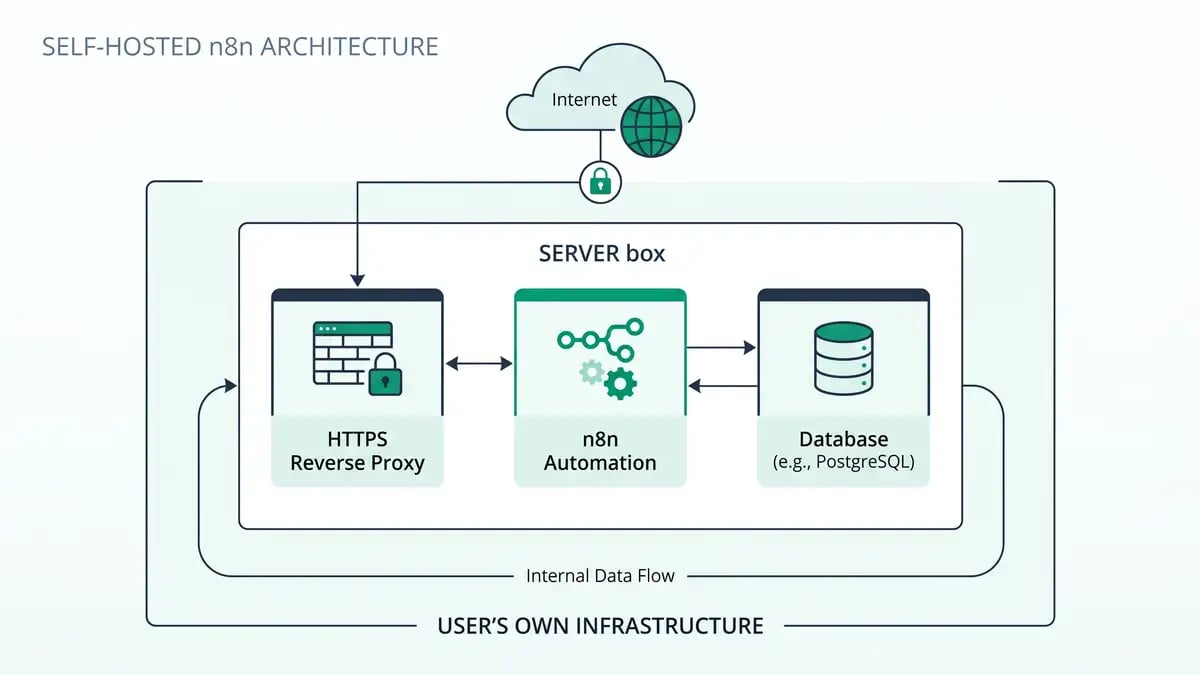
Choose your host and install Docker
Pick managed one-click hosting for least effort, or a VPS like Hetzner or DigitalOcean for full control. On a VPS, install Docker and Docker Compose first. n8n also supports npm for local testing and has guides for AWS, Azure, and Google Cloud.
Use PostgreSQL for production, not the default SQLite
Self-hosted n8n defaults to SQLite, which is fine for testing. For production, configure PostgreSQL with the DB_TYPE=postgresdb environment variables. n8n itself uses PostgreSQL for its enterprise scaling tiers for exactly this reason.
Put it behind a reverse proxy for HTTPS
Front n8n with Nginx, Caddy, or Traefik to terminate SSL and route your domain. Use a subdomain rather than combining N8N_PATH with a reverse proxy, which causes navigation issues. Managed hosts bundle HTTPS and custom domains automatically.
Set a persistent encryption key and back up
Set N8N_ENCRYPTION_KEY to a fixed value so n8n can always decrypt your stored credentials, and keep it identical across every worker. Back up both the database and that key. Losing the key means losing access to every saved credential.
Security, scaling, and the pitfalls that bite

Self-hosting moves security from the vendor to you, and the difference between a safe instance and a leaky one is configuration. n8n's own checklist is the place to start: run a security audit, enforce SSL, set up SSO, enable two-factor authentication, redact execution data so sensitive inputs and outputs are hidden, and disable the public API if you are not using it (n8n securing docs). The risk is not theoretical. Security researchers at Hakai documented credential leakage from n8n instances with exposed logs, poorly managed environment variables, or carelessly shared workflows, any of which can reveal passwords, tokens, and API keys (Hakai Security). Self-hosting keeps data on your infrastructure, but only good configuration keeps it private.
For scale, n8n offers queue mode: set EXECUTIONS_MODE=queue and run separate worker processes backed by Redis, with a load balancer routing webhook traffic to a pool of workers (n8n queue mode docs). A single instance is fine for low volume; reach for queue mode when throughput climbs. These are the same architectural decisions we apply across AI workflow automation and agentic workflows builds.
The encryption key trap
The most painful self-hosting mistake is losing your N8N_ENCRYPTION_KEY. If n8n cannot find the key it generated, or you redeploy without it, every stored credential becomes undecryptable and your workflows break. Set a fixed key, store it in a secrets manager, keep it identical across all workers, and include it in every backup alongside the database. The other classic traps: no backups, exposing the instance without SSL, running SQLite in production, and under-provisioning a tiny VPS.
Should you self-host or use n8n Cloud?
The decision comes down to volume, capability, and data rules. Self-host when you run high or growing execution volumes, need to control cost, require data residency or GDPR compliance, or have the technical capacity and want deep customization and custom nodes. Use n8n Cloud when you want a no-ops start, have a small team, run modest volumes, and would rather not own servers and security. n8n itself frames Cloud as the quick, no-ops option and self-hosting as the path for infrastructure-aware, customized teams (n8n docs). For deeper agent builds once you are hosted, see our guide to n8n AI agents.
The honest middle path for many B2B teams is to start on Cloud to validate the workflows, then move to self-hosted once volume or data requirements justify owning the stack. The platform is the same either way, so the migration is mostly operational, not a rebuild.
Self-hosting is the easy part. The system is the hard part.
peppereffect is a Master Growth Architect that designs, deploys, and secures self-hosted n8n systems for B2B companies: hardened Docker stacks, the workflows that decouple revenue from headcount, and the governance to keep your data yours. Book a Growth Mapping Call and we will map your highest-leverage automation and the infrastructure it should run on.
Book your Growth Mapping CallFrequently asked questions
Is n8n free to self-host?
Yes. The Community Edition is free and source-available under the Sustainable Use License, and you can run it on your own infrastructure with no per-execution fees. You only pay for the server, often 3 to 8 USD a month on managed hosting. The licence permits unlimited internal business use; you need a paid agreement only if you white-label, resell, or host n8n and charge customers to use it.
How do I self-host n8n?
n8n recommends Docker. Install Docker, create a named volume, then run the official image with a mapped port (5678), timezone variables, and the volume mounted at /home/node/.n8n. For production use Docker Compose with PostgreSQL and front it with a reverse proxy such as Nginx, Caddy, or Traefik for HTTPS. Managed one-click hosts like InstaPods or PikaPods handle all of this for a few dollars a month.
How much does it cost to self-host n8n?
Managed one-click hosting runs about 3 to 8 USD a month with HTTPS, automatic updates, and unlimited executions. A raw Hetzner VPS with Docker is roughly 4.51 EUR a month. By comparison, n8n Cloud Starter is around 20 USD a month capped at 2,500 executions. ExpressTech estimates self-hosting saves a single developer 636 to 684 USD a year versus n8n Cloud Pro.
Is self-hosted n8n secure?
It can be very secure, but security is your responsibility. Enforce SSL, enable SSO and two-factor authentication, redact execution data, run a security audit, and disable the public API if unused. The biggest risks come from misconfiguration: researchers have shown credential leakage from instances with exposed logs or poorly managed environment variables. Always set a persistent N8N_ENCRYPTION_KEY and back up your database.
Should I self-host n8n or use n8n Cloud?
Self-host for high or growing execution volume, cost control, data residency or GDPR, and technical teams that want customization. Use n8n Cloud for a no-ops start, small teams, and modest volumes where you would rather not manage servers. n8n frames Cloud as the quick option and self-hosting as the path for infrastructure-aware teams.
Can I use self-hosted n8n for my commercial business?
Yes, for internal business use. The Sustainable Use License explicitly allows automating your own company's processes, building custom nodes for your own product, and offering consulting or workflow-building services to clients. You need a separate commercial agreement only if you white-label n8n, resell access to it, or host it and charge customers a fee to use it.
Resources
- n8n: Hosting documentation and guides
- n8n: Docker installation
- n8n: Choose your n8n (Cloud vs self-hosted)
- n8n: Sustainable Use License
- n8n: Supported databases and settings
- n8n: Set a custom encryption key
- n8n: Configuring queue mode
- n8n: Securing n8n
- n8n: Plans and pricing
- ExpressTech: The real cost of self-hosting n8n in 2026
- InstaPods: Deploy n8n
- Server Compass: Best self-hosted PaaS platforms 2026
- Hakai Security: N8Naked, security misconfigurations in n8n