

What Is Cold Email Deliverability and Why Does It Determine Campaign Success?
Cold email deliverability measures the percentage of outbound emails that actually reach a recipient's primary inbox — not their spam folder, not a bounce-back, not a silent filter. For B2B teams running cold email outreach as a primary pipeline channel, deliverability is the invisible infrastructure layer that determines whether campaigns generate revenue or burn domains.
The numbers expose a sobering reality. According to the Validity 2025 Email Deliverability Benchmark Report, global average inbox placement sits at just 83.5% — meaning roughly one in six emails never reaches the intended recipient. Microsoft Outlook is the most restrictive environment at 75.6% inbox placement, while Gmail hovers around 86.4%. For cold email specifically, these averages drop further because cold senders lack the engagement history that established brands carry.
The gap between average and elite deliverability performance is not random variation — it reflects fundamental differences in domain reputation, authentication protocols, engagement quality, and technical implementation. Properly aged and configured domains achieve 98% deliverability rates, while rushed domains without systematic warmup deliver at just 60-70%. That 30-point spread translates directly into 3x higher engagement rates, lower long-term costs from reduced domain replacement, and sustainable scaling without reputation damage.
What you'll learn in this guide:
- How to configure SPF, DKIM, and DMARC authentication — the non-negotiable prerequisites since Gmail, Yahoo, and Microsoft mandated them
- Why dedicated sending domains and domain rotation protect your primary brand domain
- The 90-day domain aging framework that separates 98% deliverability from 60%
- Bounce rate and spam complaint thresholds that trigger blacklisting
- Cold email response rate benchmarks and the personalisation gap
- How cold email CPL compares to LinkedIn and Google Ads for B2B pipeline generation
Key Takeaway
Cold email deliverability is not a setting you toggle — it is an infrastructure you architect. The difference between 60% and 98% inbox placement comes from systematic domain preparation, authentication configuration, and reputation management executed over 90+ days before production sending begins.

Why Did Gmail, Yahoo, and Microsoft Make Email Authentication Mandatory?
In February 2024, Google and Yahoo simultaneously enforced new sender requirements that transformed email authentication from best practice to hard prerequisite. Any domain sending more than 5,000 emails daily must now implement SPF, DKIM, and DMARC authentication — or face systematic filtering and rejection. According to PowerDMARC's analysis of the new requirements, this policy shift effectively eliminated any operational pathway that avoids proper authentication setup.
Microsoft followed with even stricter enforcement. On May 5, 2025, Outlook began rejecting unauthenticated emails outright — not merely routing them to junk folders, but bouncing them entirely. For B2B cold email operations targeting professional audiences using Outlook, this means unauthenticated messages never reach the recipient at all.
The three protocols work as layered verification. SPF (Sender Policy Framework) publishes a DNS record listing which mail servers are authorized to send email on behalf of your domain. DKIM (DomainKeys Identified Mail) adds a cryptographic signature to each email, allowing recipients to verify the message was not altered in transit. DMARC (Domain-based Message Authentication, Reporting, and Conformance) ties SPF and DKIM together with a policy that tells receiving servers what to do when authentication fails — monitor, quarantine, or reject.
Despite these mandates, adoption remains surprisingly low. The EasyDMARC 2026 DMARC Adoption Report found that while 47.7% of the top 1.8 million domains have published a DMARC record, only 10.7% enforce a reject policy at full protection. The majority use p=none, which provides visibility into authentication failures but offers zero protection against spoofing. For cold email automation operators, this adoption gap creates a competitive advantage: teams with proper authentication systematically outperform those without it.
| Protocol | Function | Implementation | Impact if Missing |
| SPF | Authorizes sending servers | DNS TXT record listing IP addresses | Emails flagged as potentially spoofed |
| DKIM | Cryptographic message integrity | DNS TXT record with public key | Messages may be altered or rejected |
| DMARC | Policy enforcement for SPF/DKIM failures | DNS TXT record with p=none/quarantine/reject | No control over failed authentication handling |
Sources: PowerDMARC, Microsoft Tech Community
Avoid This Mistake
Publishing a DMARC record with p=none satisfies the minimum compliance checkbox but provides zero deliverability benefit. Move to p=quarantine within 30 days and p=reject within 90 days once you've confirmed all legitimate sending sources pass authentication. A p=none policy signals to mailbox providers that you are not confident in your own authentication — which undermines the trust signal you are trying to build.
How Should You Structure Your Cold Email Domain Architecture?

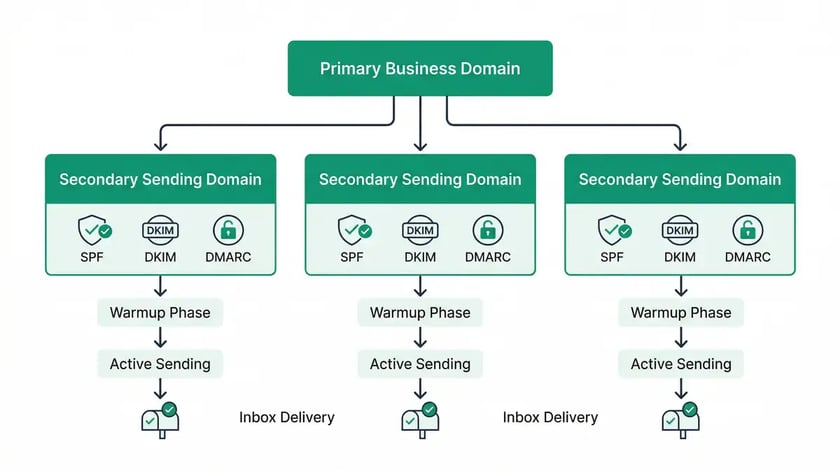
Never send cold emails from your primary brand domain. This is the foundational rule of cold email domain architecture. If a sending domain gets blacklisted or develops poor reputation from cold outreach, the damage must be contained to a secondary domain — not your company's main website, CRM communications, or transactional emails.
The standard architecture uses dedicated sending domains that are visually similar to your primary brand but technically isolated. For a company using yourcompany.com as its primary domain, sending domains might include yourcompany.io, getyourcompany.com, or yourcompany.co. Each sending domain requires its own complete authentication stack — SPF, DKIM, DMARC — and its own Google Workspace or Microsoft 365 account to build independent reputation.
Domain rotation distributes sending volume across multiple domains to prevent any single domain from exceeding volume thresholds that trigger spam filters. The recommended approach creates 3-5 sending domains, each with 2-3 mailboxes, keeping daily volume per mailbox under 50 emails. This distributes risk while maintaining the warm, human-scale sending patterns that mailbox providers reward.
For teams scaling lead generation automation, domain rotation becomes structurally critical. A single domain sending 500 cold emails daily will rapidly accumulate spam complaints and trigger rate limiting. Five domains sending 100 emails each maintain the same total volume while keeping per-domain metrics within safe thresholds. If one domain's reputation degrades, the other four continue operating while the compromised domain recovers.

What Is the 90-Day Domain Aging Framework?
Domain age is a fundamental deliverability signal because email service providers treat new domains with systematic suspicion. Spammers frequently register fresh domains to avoid detection, so Gmail, Outlook, and Yahoo apply heightened scrutiny to domains with zero sending history. The research is unambiguous: domains aged 90+ days achieve 98% deliverability, while domains rushed into production without aging deliver at just 60-70%.
The 90-day aging framework divides into three phases, each with specific activities and volume targets. This is not optional preparation — it is the infrastructure investment that determines whether your cold email outreach campaigns will reach inboxes or burn through domains.
Foundation Building (Days 1-30)
Configure SPF, DKIM, and DMARC on each new sending domain. Set up Google Workspace or Microsoft 365 with professional email addresses — avoid generic names like info@ or sales@. Send 5-10 emails daily to known contacts who will engage (internal team, existing relationships). Target 90%+ open rates and 50%+ reply rates. No promotional or sales content during this phase.
Gradual Expansion (Days 31-60)
Increase daily volume to 15-25 emails. Begin outreach to warm prospects and referrals. Maintain engagement rates above 20%. Develop consistent sending patterns — same times, similar volumes — that establish predictable behaviour signals with mailbox providers. Monitor deliverability metrics closely and address reputation issues immediately.
Scaling Preparation (Days 61-90)
Gradually increase to 30-50 daily emails. Test different email types and content formats. Monitor spam folder placement rates and fine-tune authentication settings. By weeks 11-12, reach 50-75 daily emails while maintaining high engagement. Document what works for this domain and audience before launching full-scale cold email campaigns.
Key Takeaway
The 90-day investment produces a 38-point deliverability advantage over rushed domains. For B2B teams building lead generation infrastructure, this means planning domain purchases 90 days before campaign launch — not the week before. The alternative is burning through domains, wasting budget, and rebuilding from scratch.
What Are the Bounce and Spam Complaint Thresholds That Trigger Blacklisting?
Bounce rates and spam complaint rates are the two metrics that most directly determine domain reputation — and the thresholds are tighter than most operators assume. Exceeding these thresholds does not produce a gradual degradation; it triggers binary consequences including rate limiting, spam folder routing, and outright rejection.

The benchmark for acceptable bounce rates is below 2%. Rates between 2-5% represent a warning level requiring immediate investigation, and above 5% constitutes a critical problem demanding remediation. For low-volume cold email operations sending under 200 emails daily, bounce rates have limited impact on domain reputation. But for sales automation systems running high-volume campaigns exceeding 5,000 daily emails, bounce rates above 20% will directly damage domain reputation and limit future deliverability.
Spam complaint rates carry even higher stakes. Gmail enforces a hard threshold of 0.3% spam complaints — one complaint per 333 emails. Once breached, senders lose access to mitigation tools like manual reviews or appeals, creating a compounding problem. Gmail monitors complaint rates over a rolling 30-60 day window, meaning a single problematic campaign can damage reputation for weeks. Microsoft Outlook enforces parallel thresholds for domains sending 5,000+ emails daily. Sophisticated cold email operations target 0.01-0.05% complaint rates to maintain substantial safety margin.
| Metric | Safe Zone | Warning | Critical |
| Bounce Rate | Below 2% | 2-5% | Above 5% |
| Spam Complaint Rate | Below 0.1% | 0.1-0.3% | Above 0.3% |
| Unsubscribe Rate | Below 0.5% | 0.5-1% | Above 1% |
| Inbox Placement | Above 95% | 85-95% | Below 85% |
Sources: Validity 2025 Benchmark, MailReach Deliverability Guide
Every email must include a one-click unsubscribe link that processes opt-outs without requiring additional information or navigation. When recipients can easily unsubscribe, they opt out rather than clicking spam — preserving your complaint rate. Making unsubscribe difficult drives recipients to report-spam, which damages domain reputation exponentially faster than organic unsubscribes.
Your cold email infrastructure determines your pipeline ceiling. Compare cold email vs. LinkedIn outreach economics to architect the right channel mix.
Book a Growth Mapping CallWhat Response Rates Should B2B Cold Email Campaigns Expect?
Cold email response rates have declined year-over-year, from 6.8% in 2023 to 5.8% in 2024, and the Instantly 2026 Cold Email Benchmark Report found an overall average reply rate of just 3.43% platform-wide. Yet elite practitioners consistently achieve 10%+ reply rates — 2-4 times higher than average — and highly targeted campaigns with deep personalisation reach 40-50% reply rates.
The performance gap reflects three structural factors. First, campaign size inversely correlates with response rates: campaigns targeting fewer than 50 recipients average 5.8% response rates, while campaigns exceeding 1,000 recipients drop to 2.1%. Second, personalisation drives a 32% improvement in response rates compared to generic templates, with customised subject lines boosting replies by up to 140%. Third, email length matters — messages with 6-8 sentences achieve the best results at 6.9% reply rates, and the optimal word count falls between 50-125 words.
Follow-up sequences amplify total engagement but with sharp diminishing returns. According to Martal Group's B2B cold email analysis, 58% of all replies come from the first email. The first follow-up boosts performance by up to 49%, but the third email brings 20% fewer responses than the second, and the fourth follow-up sees a 55% decline. For teams building lead nurturing sequences, the practical implication is clear: invest heavily in the quality of your first two touches rather than extending sequence length.
| Factor | Average Performance | Elite Performance |
| Overall Reply Rate | 3.43% | 10%+ (top campaigns) |
| Personalised vs. Generic | Generic: ~3% | Personalised: 35-50% |
| Small Campaign (<50 recipients) | 5.8% | 8.4% (single-email) |
| Large Campaign (1,000+ recipients) | 2.1% | Rarely exceeds 5% |
| Optimal Email Length | 50-125 words | 6-8 sentences |
Sources: Instantly 2026 Benchmark, Martal Group B2B Statistics
How Does Cold Email Cost Per Lead Compare to LinkedIn and Google Ads?
Cold email delivers the most economically efficient B2B lead acquisition model when properly executed. The cost per lead via cold email ranges from $20-80 for qualified leads, with cold email meetings costing just $3-12 each. By comparison, LinkedIn InMail meetings cost $50-500 each and LinkedIn Ads meetings cost $150-1,500 each — a 10-100x cost differential that explains why cost-conscious B2B teams treat cold email as a primary outbound lead generation lever.
Email marketing overall generates approximately $36-40 return for every $1 invested, fundamentally outperforming paid channels on ROI. LinkedIn's median cost per lead reaches approximately $75 across industries, with costs spiking to $15.72 per click during peak seasons. Google Ads presents a middle ground with business services averaging $103.54 CPL and a 3.6% average conversion rate for paid search.
The critical framework for evaluating channel economics is the LTV:CAC ratio, which should hit at least 3:1 to be economically viable. Cold email crushes this metric at $36-40 return per dollar spent. LinkedIn works if average deal sizes justify higher CAC — for high-ticket B2B SaaS products with $50,000+ deal values, paying $200 per lead becomes reasonable at higher conversion rates. For teams evaluating customer acquisition cost reduction strategies, cold email infrastructure represents the highest-leverage investment available.
| Channel | Cost Per Lead | Cost Per Meeting | ROI per $1 Spent |
| Cold Email | $20-80 | $3-12 | $36-40 |
| LinkedIn Ads | $75 median | $150-1,500 | $5-15 (estimated) |
| Google Ads | $103.54 avg | $50-200 | $8-20 (estimated) |
| LinkedIn InMail | $50-150 | $50-500 | $10-25 (estimated) |
Sources: Sopro B2B Cost Per Lead Benchmarks, Instantly 2026 Benchmark
What Compliance Requirements Apply to B2B Cold Email?
Cold email operates at the intersection of law, technology, and buyer expectations, with distinct regulatory frameworks applying based on recipient jurisdiction — not sender location. A U.S. company emailing a procurement director in Germany is subject to GDPR, not U.S. standards. This jurisdictional complexity requires systematic compliance architecture for any B2B lead generation programme operating across borders.
In the United States, the CAN-SPAM Act governs commercial email and is permissive for B2B cold outreach — it allows cold email to business addresses without prior consent as long as specific requirements are met. These include: accurate header information, non-deceptive subject lines, identification as an advertisement, a valid physical postal address, and functional opt-out mechanisms that must process requests within 10 business days. Each violation carries penalties of up to $53,088 per email.
The European Union's GDPR and ePrivacy Directive shift emphasis from transparency to consent and data protection. Outreach must be grounded in either explicit consent or well-documented legitimate interest. For B2B scenarios, cold emails can fall under legitimate interest if the recipient would reasonably expect professional outreach, but documentation obligations and rights management (subject access requests, erasure, clear opt-outs) are non-negotiable. Canada's CASL is among the most restrictive globally, requiring either explicit consent or narrow implied consent windows.
The practical implication for teams deploying AI workflow automation for cold email at scale: compliance requirements have become structurally complex. Data provenance — where contact data came from, how it is refreshed, and how exclusions persist — matters more than list size. Cross-border data transfer under GDPR requires appropriate safeguards even for outreach purposes. For global cold email operations, consulting compliance specialists is no longer optional.
Key Takeaway
Compliance is not a checkbox exercise — it is structural infrastructure. CAN-SPAM permits B2B cold email in the U.S. with specific requirements. GDPR requires documented legitimate interest for EU recipients. CASL effectively prohibits cold email to Canadian recipients without prior consent. Your compliance architecture must match the jurisdictional complexity of your target market.
Frequently Asked Questions
How long does it take to warm up a new cold email domain?
A proper domain warmup takes 90 days across three phases: foundation building (days 1-30) with 5-10 emails daily to known contacts, gradual expansion (days 31-60) scaling to 15-25 emails, and scaling preparation (days 61-90) reaching 50-75 daily emails. Rushing this process produces 60-70% deliverability versus 98% for properly aged domains. Plan domain purchases at least three months before campaign launch to avoid the deliverability penalty that comes with cold email outreach on fresh domains.
What is a good cold email response rate for B2B?
The platform-wide average cold email reply rate is 3.43% according to the Instantly 2026 Benchmark. Top-performing campaigns achieve 10%+ reply rates through advanced personalisation, and highly targeted campaigns with deep customisation reach 40-50%. Campaigns targeting fewer than 50 recipients average 5.8%, while campaigns exceeding 1,000 recipients drop to 2.1%. The key driver is personalisation depth — personalised emails outperform generic templates by 32%, and customised subject lines boost replies by up to 140%.
Do I need DMARC for cold email?
Yes — DMARC is now mandatory. Since February 2024, Google and Yahoo require SPF, DKIM, and DMARC authentication for domains sending 5,000+ emails daily. Microsoft Outlook began rejecting unauthenticated emails entirely from May 2025. Even for low-volume senders, DMARC builds the reputation foundation that enables future scaling. Start with p=quarantine and progress to p=reject within 90 days once you have confirmed all legitimate marketing automation sending sources pass authentication.
How many cold emails can I send per day without getting blacklisted?
Keep daily volume per mailbox under 50 emails and distribute total volume across 3-5 sending domains with 2-3 mailboxes each. This architecture supports 300-750 daily cold emails while maintaining per-domain metrics within safe thresholds. The critical constraints are bounce rates below 2% and spam complaint rates below 0.3%. Monitor with Google Postmaster Tools and maintain a CRM automation integration that suppresses bounced and unsubscribed addresses in real time.
Should I use a dedicated IP or shared IP for cold email?
Most B2B cold email operations should use shared IP infrastructure through platforms like Google Workspace or Microsoft 365. Dedicated IPs require consistent daily volume of 50,000+ emails to maintain warm reputation — volume most cold email campaigns do not reach. Shared IPs inherit baseline reputation from the provider's broader sender pool, providing stability without the volume commitment. Dedicated IPs become relevant only for enterprise-scale operations with lead generation automation generating consistent high volumes.
What is the cost per lead for cold email versus LinkedIn?
Cold email CPL ranges from $20-80 with meetings costing $3-12 each. LinkedIn Ads generate leads at approximately $75 median CPL with meetings costing $150-1,500 each. This 10-100x cost differential makes cold email the most economically efficient B2B pipeline channel. However, LinkedIn excels at targeting specific decision-makers — 89% of B2B marketers use LinkedIn for lead generation. The optimal approach combines both channels: cold email for volume pipeline generation and LinkedIn for high-value account targeting.
How do I check if my cold email domain is blacklisted?
Monitor domain reputation using Google Postmaster Tools (direct insight into Gmail deliverability), Microsoft SNDS (Outlook/Hotmail reputation), and third-party tools like MXToolbox or Sender Score (target 80+). Check blacklists at least weekly using aggregators that scan multiple DNS-based blackhole lists (DNSBLs) simultaneously. If blacklisted, identify the root cause — typically high bounce rates or spam complaints — remediate the issue, and submit delisting requests. Prevention is more effective than cure: maintaining bounce rates below 2% and complaint rates below 0.1% keeps domains off blacklists entirely.
Your Cold Email Infrastructure Is Your Pipeline Ceiling
peppereffect architects bulletproof cold email domain infrastructure for B2B teams — from DNS authentication and domain rotation to warmup sequencing and deliverability monitoring. Stop burning domains. Start building autonomous pipeline.
Book Your Growth Mapping CallSee how AI agents handle cold email inbox triage → cold email outreach playbook AI agents for cold email
Resources
- Validity — 2025 Email Deliverability Benchmark Report
- EasyDMARC — 2026 DMARC Adoption Report
- Microsoft Tech Community — Outlook Sender Requirements for High-Volume Senders
- PowerDMARC — Google and Yahoo Email Authentication Requirements
- Instantly — 2026 Cold Email Benchmark Report
- Martal Group — B2B Cold Email Statistics
- Sopro — B2B Cost Per Lead Benchmarks
- MailReach — Cold Email Deliverability Sending Strategy