

The CRM Paradox: Why Your Most Expensive Tool Is Your Least Productive
Ninety-one percent of companies with ten or more employees use a CRM. Yet sales representatives spend just complete B2B sales automation architecture 28% of their time actually selling — the rest disappears into data entry, pipeline updates, and administrative tasks. According to 2025 CRM market research, the average CRM delivers $8.71 for every $1 invested. That's strong — but it masks a deeper problem. RevOps operating system an AI email assistant
Most B2B companies use their CRM as a digital filing cabinet. They store contacts, log activities, and generate reports — all manually. The CRM becomes a record of what happened yesterday, not an engine that drives what happens tomorrow.
CRM automation changes the architecture. It transforms your CRM from a passive database into an autonomous intelligence hub — one that scores leads, triggers workflows, enriches contacts, nurtures prospects, and forecasts revenue expansion playbooks without human intervention.
$8.71
ROI Per $1 Invested
Average CRM return, 2025
91%
CRM Adoption
Companies with 10+ employees
28%
Time Actually Selling
Rest lost to admin tasks
43%
Workload Reduction
With CRM automation
This guide maps the transformation. You'll learn:
- Why manual CRM operations create a structural ceiling on growth
- The five automation layers that turn a CRM into an intelligence hub
- How to implement lead scoring SaaS lead generation strategies that actually predicts conversion
- Workflow automation patterns that eliminate workflow automation strategies 5–10 hours of admin per week
- AI-powered forecasting that makes pipeline predictions actionable
- ROI benchmarks and measurement frameworks for CRM automation
What Is CRM Automation?


CRM automation is the systematic use of technology to execute repetitive CRM tasks — data entry, lead routing, follow-up sequencing, pipeline updates, and reporting — without manual intervention. It's distinct from CRM software (the platform) and CRM strategy (the methodology). Automation is the execution layer that makes both productive.
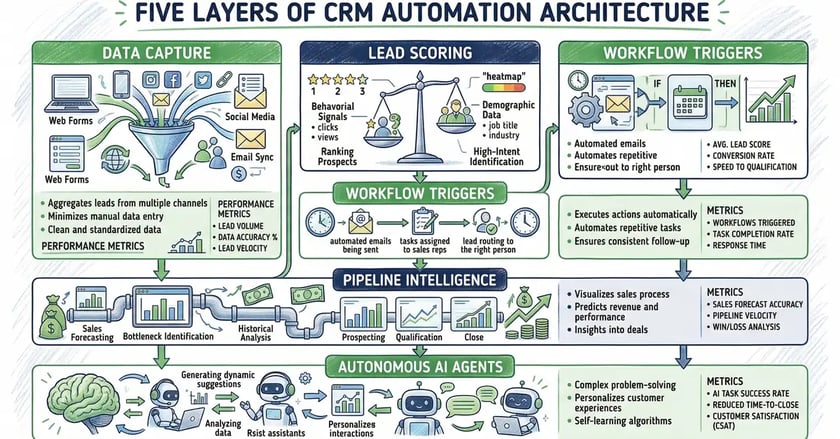
The best CRM automation operates across five layers, each building on the last:
| Automation Layer | What It Does | Business Impact |
| Data Capture | Auto-logs emails, calls, meetings, and form submissions into contact records | Eliminates manual data entry — saves 17% of admin time |
| Lead Scoring | Assigns point values based ABM operating model on behaviour and firmographic fit | 30% improvement in lead conversion rates |
| Workflow Triggers | Executes multi-step sequences when conditions are met | 28% faster deal closure through automated follow-ups automated fulfillment pipeline |
| Pipeline Intelligence | Tracks deal velocity, flags stalled opportunities, predicts outcomes | 40%+ improvement in forecast accuracy |
| Autonomous Agents | AI agents handle multi-step tasks: enrichment, outreach, scheduling | 2–3 hours saved per rep per day |
Without all five layers, you're using your CRM as a database — not an intelligence hub.
Why Manual CRM Operations Create a Growth Ceiling
Key Takeaway
CRM automation operates across five layers — data capture, lead scoring, workflow triggers, pipeline intelligence, and autonomous agents. Companies that implement all five layers transform their CRM from a passive filing cabinet into an active intelligence hub that drives revenue without proportional headcount growth.
Manual CRM operations don't just waste time — they create a structural ceiling on how fast your business can grow. Every new lead requires human processing. Every deal stage needs manual updating. Every follow-up depends on someone remembering to send it.
The data tells the story. According to MarketsandMarkets' 2025 productivity analysis, sales representatives spend 20–30% of their working hours on repetitive administrative tasks — data entry, CRM updates, report compilation, and meeting scheduling AI meeting extraction for CRM.
Five structural failures define manual CRM operations:
- Data decay. Contact information degrades at 25–30% annually. Without automated enrichment, your database becomes unreliable within 18 months. Sales teams waste time chasing outdated contacts.
- Follow-up failure. The average B2B sale requires 8–12 touchpoints. Manual follow-up systems lose prospects between touches. According to CRM automation research, automated follow-ups close deals 28% faster than manual approaches.
- Pipeline blindness. Without automated tracking, managers rely on rep self-reporting for pipeline visibility. This creates forecasting errors, missed warning signs, and reactive rather than proactive management.
- Lead response lag. Speed-to-lead is the single strongest predictor of conversion. Manual routing creates delays. Automated routing delivers leads to the right rep in seconds — not hours.
- Scaling impossibility. Manual processes scale linearly: more leads require more people. Automated processes scale exponentially: the system handles volume increases without proportional headcount growth.
The alternative is architectural: design your CRM as an autonomous system where every repetitive task is handled by automation, and humans focus exclusively on relationship-building and strategic decisions.
Avoid This Mistake
Starting with AI-powered CRM automation before your data foundation is solid. Contact data degrades at 25–30% annually. If you deploy predictive lead scoring on a database full of duplicates, missing fields, and outdated records, the AI amplifies bad data at machine speed. Clean your CRM first, automate second.
Lead Scoring Automation: Predicting Conversion Before It Happens
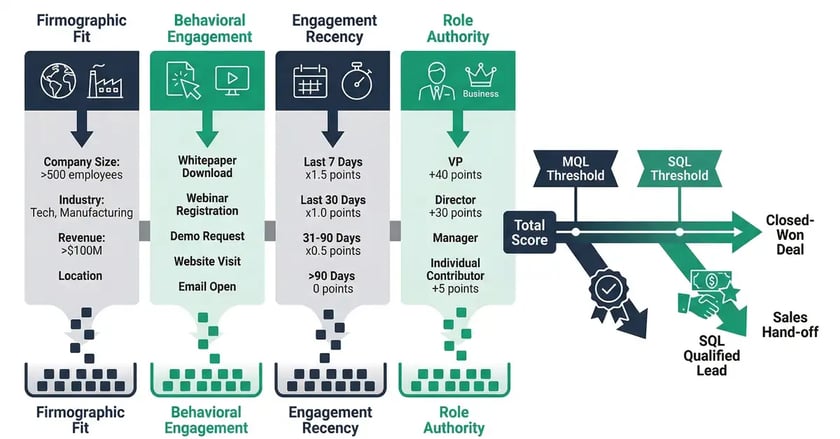
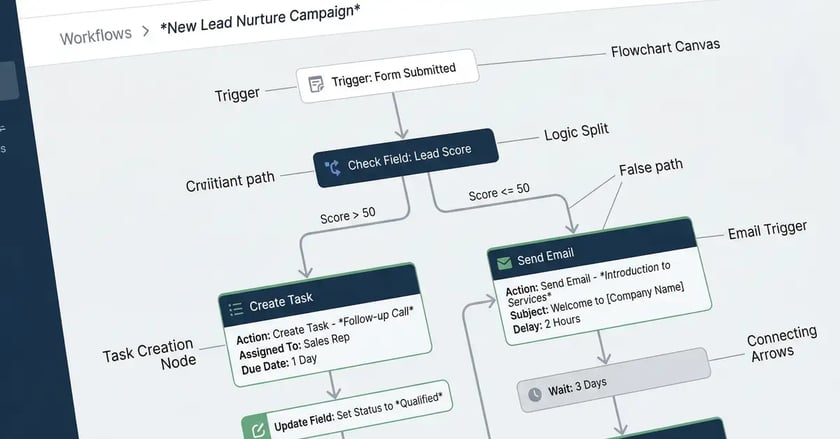
Lead scoring is the most impactful CRM automation you can implement. It assigns numerical values to prospects based on their behaviour and profile, automatically prioritising high-intent leads for immediate sales attention.
According to B2B lead scoring research, companies that implement automated lead scoring see 30% improvements in conversion rates — because sales teams focus on prospects who are actually ready to buy.
Building an Effective Scoring Model
Start with rule-based scoring, then layer in AI-assisted models once you have sufficient historical data — typically 1,000+ leads and 100+ closed deals. Rule-based scoring is simpler to set up and easier to explain to your team.
Effective lead scoring combines four dimensions:
| Scoring Dimension | Signals | Point Range |
| Firmographic Fit | Company size, industry, revenue, location matching your ICP | 0–30 points |
| Behavioural Engagement signal-based behavioral triggers | Demo bookings (+50), email replies (+30), pricing page visits (+25), case study downloads (+15) | 0–100 points |
| Engagement Recency | Last interaction within 7 days (full score), 30 days (50%), 90+ days (25% monthly decay) | Multiplier: 0.25–1.0x |
| Role Authority | C-suite (+25), VP/Director (+15), Manager (+10), Individual contributor (+5) | 0–25 points |
Qualification Thresholds
Set clear thresholds that trigger automated actions:
- Marketing Qualified Lead (MQL): 50–70 points. CRM automatically enrols the contact in a targeted nurture sequence and notifies the marketing team.
- Sales Qualified Lead (SQL): 80+ points. CRM creates a task for the assigned sales rep, sends an internal alert, and updates the lifecycle stage — all automatically.
- Score decay: 25% monthly reduction for inactive leads. This prevents outdated high-scoring leads from cluttering your pipeline.
Review and adjust your scoring model quarterly based on actual conversion data. The model should evolve as your market, product, and buyer behaviour change.
Key Takeaway
Lead scoring is the single most impactful CRM automation. Companies using automated scoring see 30% higher conversion rates because sales teams focus on prospects who are actually ready to buy — not just the most recent entries in the database.
Workflow Automation: Eliminating 5–10 Hours of Admin Per Week
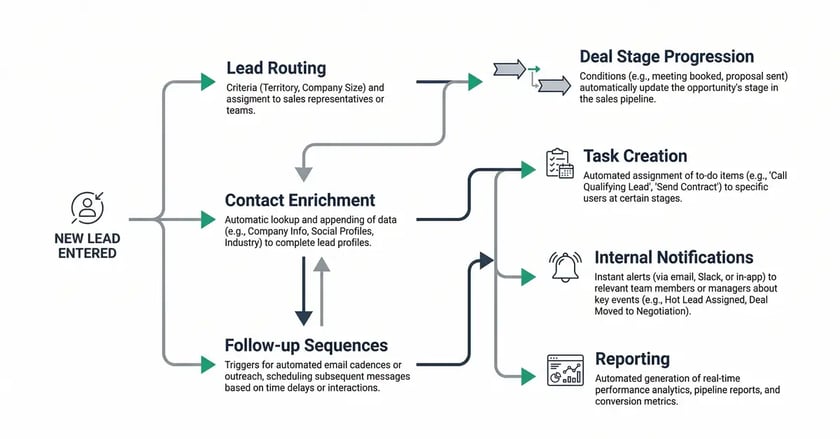

Workflow automation is where CRM automation delivers its most tangible ROI. According to CRM automation research, 43% of businesses report that CRM automation reduces employee workload by 5 to 10 hours per week. That's a full working day recovered — every week, for every employee.
$8.71 return for every $1 invested — that's the average CRM ROI, rising to $9.50+ with AI-powered automation. The gap between basic CRM and automated CRM is where profit lives. — SellersCommerce CRM Statistics
The Seven Core Workflow Automations
Every B2B CRM should automate these seven workflows as a minimum:
- Lead routing. When a new lead enters the system — via form, import, or API — the CRM automatically assigns it to the right rep based on territory, industry, deal size, or round-robin logic. Response time drops from hours to seconds.
- Contact enrichment. New contacts trigger automatic data enrichment — pulling LinkedIn profiles LinkedIn lead generation, company firmographics, and technographic data from tools like Clearbit or ZoomInfo. Reps receive complete prospect profiles before their first call.
- Follow-up sequences. When a prospect takes a specific action — downloads a guide, visits the pricing page, opens an email three times — the CRM triggers a personalised follow-up sequence. No human intervention needed until the prospect responds.
- Deal stage progression. As meetings are booked, proposals sent, or contracts viewed AI proposal generator, the CRM automatically updates deal stages and notifies stakeholders. Pipeline visibility becomes real-time, not retroactive.
- Task creation and reminders. The CRM creates tasks based on triggers: "Follow up with prospect 3 days after proposal sent proposal automation workflow." Reps never forget a touchpoint because the system manages the cadence.
- Internal notifications. When a high-value lead hits SQL threshold, when a deal stalls for 14+ days, when a contract is opened — the right people get notified instantly.
- Reporting automation. Weekly pipeline reports, monthly conversion analyses, and quarterly forecasts generate automatically. According to sales automation research, automated workflows cut reporting time by 27%.
Ready to transform your CRM from a filing cabinet into an autonomous intelligence hub? See how peppereffect architects CRM automation systems for B2B founders.
View Sales ArchitectureAI-Powered CRM: From Automation to Autonomy

Traditional CRM automation follows rules: "If X happens, do Y." AI-powered CRM goes further — it learns patterns, makes predictions, and takes autonomous action within defined guardrails.
According to CRM statistics research, 65% of companies now have AI-integrated CRM systems, projected to exceed 70% by end of 2026. AI-powered CRM delivers 30% ROI versus 20% for traditional systems — a 50% premium driven by predictive capabilities.
Predictive Lead Scoring
Where rule-based scoring assigns points you define, predictive scoring uses machine learning to analyse historical conversion data — identifying patterns across won and lost deals that humans miss. The system learns which combination of firmographic attributes, behavioural signals, and engagement patterns predict conversion most accurately.
Sales Forecasting
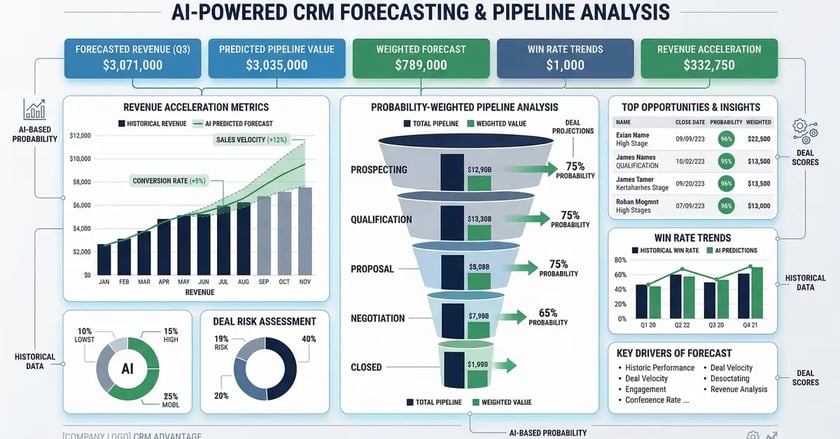
AI analyses deal velocity, win rates by stage, rep performance history, and seasonal patterns to generate probability-weighted pipeline forecasts. This replaces gut-feel forecasting with data-driven predictions that improve over time. Organisations using AI-powered forecasting report 40%+ improvements in forecast accuracy.
Autonomous AI Agents
The frontier of CRM automation is agentic AI — autonomous agents that handle multi-step tasks without human intervention. When a new lead enters the CRM, an AI agent can:
- Scrape LinkedIn to verify current job titles and company information
- Pull firmographic data from enrichment platforms
- Score the lead against your ICP criteria
- Draft a personalised outreach email based on the prospect's industry and role
- Schedule the email in the optimal send window
- Create a follow-up task sequence for the assigned rep
All of this happens in minutes — not the hours or days that manual processes require. The rep's first interaction with the lead is informed, timely, and personalised.
Key Takeaway
The compound effect is where real value emerges. When automated lead scoring routes better leads faster, automated nurturing keeps them engaged, and automated pipeline tracking prevents deals from stalling — the entire revenue engine accelerates. 94% of businesses report productivity increases after implementing CRM automation.
CRM Automation ROI: Measuring What Matters
CRM automation generates returns across three dimensions — time savings, conversion improvements, and revenue acceleration. The key is measuring all three, not just the most visible.
| Metric Category | Key Metrics | Benchmark |
| Time Savings | Hours saved per rep per week, reduction in data entry time, reporting time reduction | 5–10 hours/week per employee; 17% data entry reduction; 27% less reporting time |
| Conversion Impact | Lead-to-MQL rate, MQL-to-SQL rate, SQL-to-close rate, speed-to-lead | 30% conversion improvement; 28% faster deal closure; 95% more leads captured |
| Revenue Acceleration | Pipeline velocity, average deal size, forecast accuracy, customer lifetime value | $8.71–$9.50 ROI per $1 invested; 15% shorter sales cycles; 40%+ forecast accuracy gain |
The compound effect is where real value emerges. When automated lead scoring routes better leads faster, and automated nurturing keeps them engaged, and automated pipeline tracking prevents deals from stalling — the entire revenue engine accelerates. According to Cirrus Insight's CRM research, 94% of businesses report productivity increases after implementing CRM automation.
Implementation Roadmap: From Manual CRM to Intelligence Hub
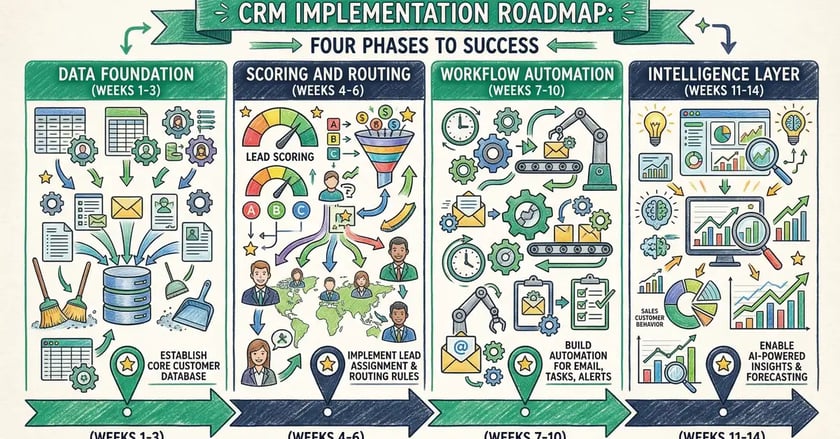
Transformation doesn't happen overnight. The most effective approach starts simple, measures rigorously, and scales from there.
Phase 1: Data Foundation (Weeks 1–3)
- Audit your current CRM data quality — identify duplicates, missing fields, and outdated records
- Implement automated data capture for all inbound channels: forms, email, calls, meetings
- Set up contact enrichment workflows to populate firmographic and technographic data
- Define your Ideal Customer Profile (ICP) criteria for scoring
Phase 2: Scoring and Routing (Weeks 4–6)
- Build your lead scoring model: firmographic fit + behavioural engagement + recency + role authority
- Set MQL and SQL thresholds with automated lifecycle stage transitions
- Implement automated lead routing based on territory, industry, or round-robin
- Create internal notification workflows for high-value lead events
Phase 3: Workflow Automation (Weeks 7–10)
- Build automated follow-up sequences for key buyer journey stages
- Implement deal stage automation with task creation and stakeholder notifications
- Set up automated reporting: weekly pipeline reviews, monthly conversion analyses
- Create re-engagement workflows for stalled deals and dormant contacts
Phase 4: Intelligence Layer (Weeks 11–14)
- Layer predictive lead scoring onto your rule-based model (requires 1,000+ lead history)
- Implement AI-powered sales forecasting and pipeline predictions
- Deploy autonomous agents for contact enrichment and outreach personalisation
- Build continuous optimisation loops: monitor, measure, iterate quarterly
Frequently Asked Questions
How much does CRM automation cost?
CRM automation costs range from included-in-platform (HubSpot HubSpot Content Hub's built-in workflows) to £50–200k for enterprise implementations with custom integration integration strategys and AI layers. The ROI typically justifies the investment within 3–6 months — businesses earn $8.71 for every $1 invested in CRM, and that figure rises to $9.50+ with AI-powered automation.
Which CRM platforms offer the best automation?
HubSpot, Salesforce, and Microsoft Dynamics 365 lead in automation capabilities. HubSpot excels for mid-market B2B with its native workflow builder. Salesforce dominates enterprise with Einstein AI. The right choice depends on your tech stack, team size, and integration requirements.
How long does it take to see results from CRM automation?
Quick wins appear within 2–4 weeks — automated data capture and lead routing deliver immediate time savings. Lead scoring impact shows within 6–8 weeks as conversion data accumulates. Full pipeline acceleration typically takes 3–6 months as automated workflows compound across the entire sales cycle.
Can CRM automation replace sales representatives?
No. CRM automation replaces administrative tasks, not relationship-building. The goal is to give each rep 2–3 additional selling hours per day by eliminating data entry, manual follow-ups, and report compilation. The human element — understanding needs, building trust, negotiating terms — remains irreplaceable.
What's the difference between CRM automation and marketing automation?
Marketing automation focuses on top-of-funnel activities: email campaigns, lead nurturing, content delivery. CRM automation covers the full pipeline: lead scoring, deal tracking, sales workflows, forecasting, and post-sale management. The best B2B operations integrate both — marketing automation feeds qualified leads into CRM automation for pipeline management.
How do I measure CRM automation ROI?
Track three layers: time savings (hours saved per rep per week), conversion improvements (lead-to-close rate changes), and revenue acceleration (pipeline velocity, forecast accuracy, deal size). Connect your CRM analytics to financial reporting so you can trace automation investments to revenue outcomes.
The Bottom Line: From Filing Cabinet to Intelligence Hub
The gap between B2B companies that scale efficiently and those that plateau is infrastructure — specifically, whether their CRM operates as a passive database or an active intelligence hub.
CRM automation isn't a feature — it's an architectural decision. It transforms your most expensive tool into your most productive one: scoring leads automatically, routing opportunities instantly, nurturing prospects systematically, and forecasting revenue accurately.
The organisations winning now aren't hiring more sales reps to handle more leads. They're building CRM intelligence systems that handle volume increases without proportional headcount growth — decoupling revenue from manual effort.
At peppereffect, we architect these systems. From lead generation to sales administration to marketing infrastructure — we install the CRM operating system that turns your data into a 24/7 revenue engine. Explore how we build it.
Resources
- Kixie — CRM Statistics and Market Insights for 2025
- SLT Creative — Key CRM Statistics for 2025: Market Trends, Adoption, and Impact
- MarketsandMarkets — Sales Automation vs Manual Processes: Productivity Analysis
- Aurora Nexus — CRM Automation 2026: Stop Losing Leads and Increase Revenue
- Cleverly — B2B Lead Scoring Explained: Models, Examples, and Automation
- Utmost Agency — 50+ Sales Automation Statistics That Guarantee ROI in 2026
- Cirrus Insight — A 360° View of the CRM Market for 2025
- SellersCommerce — Top CRM Statistics You Need To Know In 2025
workflow automation infrastructure
CRM and marketing automation integration
AI sales automation strategies
document tracking capabilities
B2B marketing automation platforms
AI proposal generation engine
recruitment CRM pipeline tracking dormant pipeline recovery B2B lead generation systems
goal-driven AI marketing systems
automated customer success systems
NRR benchmarks Net Revenue Retention benchmarks SaaS growth playbook
SaaS margin architecture lead scoring architecture revenue-driving email sequences pipeline velocity playbook CRM and revenue intelligence comparison SaaS sales playbook architecture