

Most teams adopt n8n, build one workflow, and then stall, because the hard part is not the tool, it is knowing what is actually worth automating. This guide answers that with real, named workflows B2B teams run in production today, organised by department, each with the trigger, the apps, and the outcome. No toy examples. By the end you will have a concrete shortlist of automations you could build this quarter.
n8n is used to connect apps and orchestrate work across a business: enriching and scoring leads into a CRM, syncing data between systems like Stripe and HubSpot, triaging customer support, automating onboarding and finance, running IT alerts, and building AI agents. Real companies run it at scale: StepStone runs more than 200 mission-critical workflows on n8n, and Vodafone reported 2.2 million pounds saved in a threat-intelligence programme automated with it. The community library holds more than 7,000 AI workflows alone, so most use cases start from a template, not a blank canvas.
This is a practitioner's catalogue, not a feature tour. Every figure and named workflow is sourced.
What is n8n actually used for?
n8n is best understood as an orchestration layer rather than a single-purpose app. It sits between your tools and moves data, triggers actions, and runs logic across them, whether that is a CRM, a help desk, a database, an AI model, or an internal service (n8n docs). With 400+ integrations plus an HTTP node for anything with an API, the practical answer to "what can it automate" is "almost any repeatable process that spans two or more systems." If you are new to the platform, start with our explainer on what n8n is, then come back here for what to build.
The demand behind this is not niche. The workflow automation market is forecast to grow from 26.01 billion USD in 2026 to 40.77 billion USD by 2031, a compound annual growth rate of roughly 9.41 percent (Mordor Intelligence). The rest of this guide breaks the opportunity into the six areas where B2B teams get the most value, with named workflows for each.
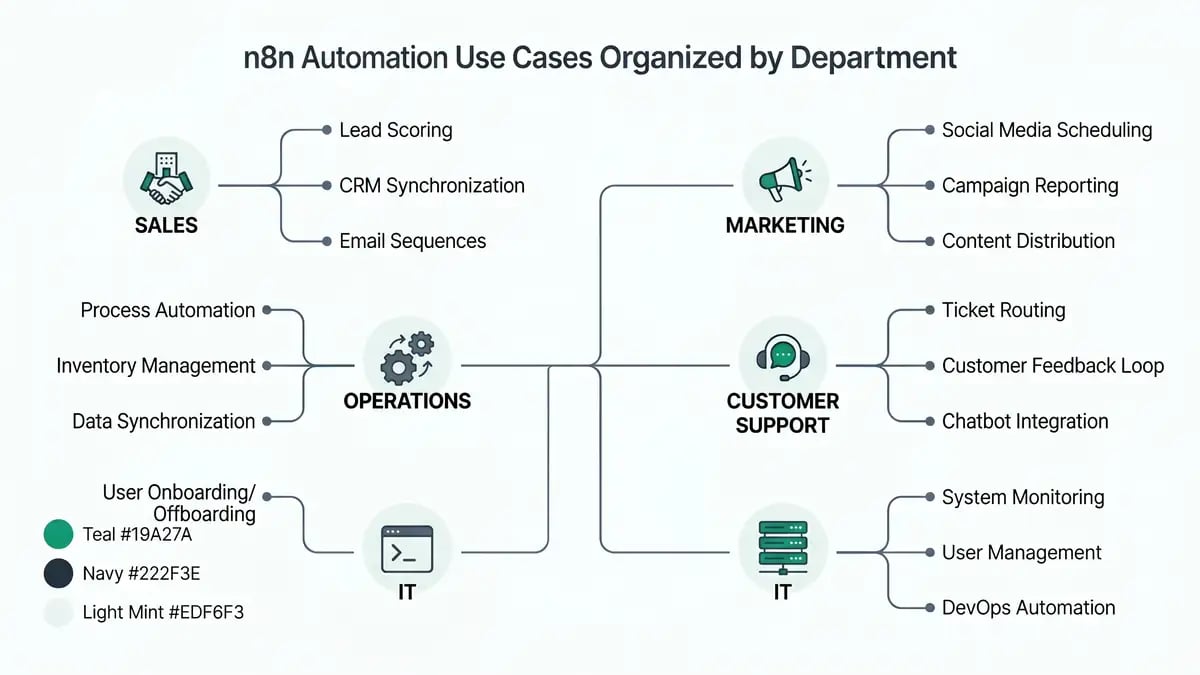
Sales and lead generation use cases

Sales is where most teams see the fastest payback, because the work is high-volume, repetitive, and data-heavy. The flagship pattern is automated lead capture, enrichment, and scoring. A popular community workflow takes raw inbound leads, enriches them with Clearbit, scores them, writes them into HubSpot, and alerts the right rep in Slack, turning unqualified form fills into prioritised, sales-ready records without manual triage (n8n template 7343). n8n maintains entire workflow categories for sales and lead generation built on this idea.
Beyond capture, the high-value sales automations are lead routing and round-robin assignment, CRM data hygiene (deduplication and field enrichment), automated follow-up sequences triggered by buyer behaviour, and meeting scheduling. These are the same building blocks behind a full AI workflow automation system, and they compound: clean data feeds better scoring, which feeds faster follow-up.
The takeaway
Start your first n8n build in sales. Lead enrichment and scoring is the highest-leverage workflow for most B2B teams: it runs on every inbound lead, it is well-templated so you are not starting from scratch, and the outcome (faster response to qualified leads) maps directly to revenue.
CRM and data-sync use cases
The quiet killer of B2B operations is data trapped in silos, and CRM sync is where n8n earns its keep daily. The canonical pattern is keeping systems in agreement automatically. The template "Update HubSpot when a new invoice is registered in Stripe" keeps revenue data flowing from billing into the CRM without anyone rekeying it, and related workflows create HubSpot contacts from LinkedIn post interactions or capture leads in HubSpot from Typeform submissions (n8n CRM automation).

The principle is that any time two tools hold the same record, n8n can keep them in sync on a trigger rather than a schedule, so the data is current the moment it changes. That is the foundation of CRM automation done properly, and it removes the manual exports and copy-paste that quietly consume operations hours. Because n8n bills per workflow execution rather than per step, these multi-step sync flows stay cheap even at high volume, a key reason teams pick it over per-task tools (see our n8n vs Zapier comparison).
Customer support use cases
Support is the function where automation most visibly changes the customer experience, not just the back office. n8n's Multi-Channel Customer Support Automation Suite triages and routes incoming tickets across channels into a unified flow, and the template reports reducing response times by up to 80 percent while ensuring no inquiry goes unresolved (n8n template 5135). That is a concrete, quantified outcome for a function usually measured in SLA breaches.
The bigger shift is AI-assisted support. Using retrieval-augmented generation, you can ground an AI responder in your own help docs and knowledge base so it answers from your content rather than guessing (n8n RAG docs). Pair that with human-in-the-loop approval for sensitive replies and you get speed without losing control. We cover the build pattern in our guide to n8n AI agents.
Want a shortlist of the highest-ROI automations for your team?
Get an automation opportunity mapOperations, finance, and HR use cases

Internal operations is where automation reclaims the most hidden hours. Employee onboarding is a clean example: the template "Automate Employee Onboarding with Slack, Jira and Google Workspace" provisions accounts, creates tasks, and sends the right welcome steps the moment a hire is confirmed, replacing a checklist that usually spans three tools and several people (n8n template 3860). On the finance side, integrations like QuickBooks Online with Stripe reconcile invoices and payments automatically instead of through month-end spreadsheet surgery (n8n QuickBooks and Stripe).
The same engine handles approval workflows, document processing, recurring reporting, and data ETL between operational systems. These unglamorous automations are exactly what lets a company grow revenue without growing headcount, and they are how you calculate real automation ROI: hours reclaimed, errors eliminated, and cycle times cut.
IT, DevOps, and AI agent use cases

For technical teams, n8n is an automation fabric for monitoring, alerting, and incident response, the kind of glue work that otherwise lives in brittle scripts (n8n ITOps). The proof point is scale: recruitment platform StepStone runs more than 200 mission-critical workflows on n8n in production, and Vodafone reported 2.2 million pounds in savings from a threat-intelligence programme built on it (n8n case studies). These are not hobby automations; they are core infrastructure.
The fastest-growing category is AI agents. n8n acts as the orchestration layer that connects models to your business systems, with more than 7,000 AI-related workflows in the community library covering data extraction, summarisation, classification, and support (n8n AI workflows). Crucially, you can add human-in-the-loop checkpoints so an agent pauses for approval before it acts, which is what makes agentic automation safe enough for production (n8n human-in-the-loop docs). For the broader pattern, see our guides to agentic workflows and no-code AI agents.
| Function | Example n8n workflow | Outcome |
| Sales | Lead capture, enrichment, scoring (HubSpot, Clearbit, Slack) | Qualified, prioritised leads with no manual triage |
| CRM / data sync | Stripe invoice updates HubSpot; Typeform to HubSpot | Systems stay current on every change |
| Customer support | Multi-channel triage suite; RAG chatbot | Up to 80% faster response times |
| Operations / HR | Onboarding across Slack, Jira, Google Workspace | Hires productive on day one, zero checklist gaps |
| Finance | QuickBooks and Stripe reconciliation | No month-end spreadsheet surgery |
| IT / AI agents | Monitoring and incident response; AI agents with human-in-the-loop | StepStone 200+ workflows; Vodafone £2.2M saved |
Sources: n8n template 7343, n8n template 5135, n8n case studies.
How to choose your first n8n use case
The catalogue is large, so the discipline is picking the right starting point rather than automating everything at once. Use these four steps.
Pick a high-frequency, multi-system process
The best first automation runs often and spans two or more tools, because that is where manual effort and copy-paste errors concentrate. Lead enrichment, CRM sync, and ticket triage all qualify.
Start from a template, not a blank canvas
With thousands of community workflows available, most use cases already have a starting template you can import and adapt. This cuts build time from days to hours. See our guide to finding and using n8n templates.
Add AI only where it earns its place
Use AI for the steps that need judgement, such as classifying a ticket, summarising a thread, or drafting a reply, and keep deterministic logic for everything else. Add human-in-the-loop approval before any action that touches a customer or moves money.
Decide cloud vs self-hosted before you scale
Volume and data-residency needs determine where you run it. High-volume or regulated workloads favour self-hosting; small teams favour cloud. See our guides to n8n pricing and self-hosting n8n.
The mistake that stalls most rollouts
Teams try to automate a vague, end-to-end mega-process on day one, hit edge cases, and give up. Pick one narrow, high-frequency workflow with a clear trigger and a measurable outcome, ship it, then expand. A working lead-enrichment flow beats a half-built "automate everything" project every time.
The use cases are well-documented and the templates are free. The hard part is sequencing them into a system that compounds, choosing what to build first, wiring it to your real tools, and adding the guardrails that keep it reliable. That is where a build partner pays for itself.
Turn this catalogue into a working system.
peppereffect is a Master Growth Architect that designs and installs n8n automation across your sales, operations, and support, matched to your tools and your volume. We pick the highest-leverage workflows, build them, and add the guardrails that keep them running. Book a Growth Mapping Call and we will map the automations that decouple your revenue from headcount.
Book your Growth Mapping CallFrequently asked questions
What is n8n used for?
n8n connects apps and orchestrates processes across a business: syncing data between systems, enriching and routing leads, keeping a CRM clean, triaging support, automating onboarding and finance, running IT alerts, and building AI agents. It is an orchestration layer with 400+ integrations plus an HTTP node for anything else, not a single-purpose tool.
What are the most common n8n use cases?
Lead capture, enrichment and scoring into a CRM; cross-system data sync such as Stripe to HubSpot; customer support triage and AI chatbots; employee onboarding across Slack, Jira and Google Workspace; finance automation like QuickBooks and Stripe reconciliation; IT monitoring and incident response; and AI agent workflows for classification and summarisation.
Can n8n be used to build AI agents?
Yes. n8n is widely used as an orchestration layer for AI agents, including RAG chatbots grounded in your own documents, classification and summarisation, and multi-step agentic workflows with human-in-the-loop approval. The community library holds more than 7,000 AI-related workflows.
Is n8n good for B2B businesses?
Yes. Recruitment platform StepStone runs more than 200 workflows on n8n in production, and Vodafone reported 2.2 million pounds saved in a threat-intelligence programme automated with it. Execution-based pricing, self-hosting for data control, and code flexibility make it well suited to scaling B2B operations.
What can you automate with n8n in sales?
Lead capture from forms and LinkedIn, enrichment with tools like Clearbit, scoring and routing into a CRM such as HubSpot with Slack alerts, CRM data hygiene, follow-up sequences, and meeting scheduling. A popular template turns raw leads into scored, qualified prospects automatically.
Do you need to code to use n8n?
No. n8n has a visual, node-based builder and thousands of ready-made templates you can import and adapt without code. Technical teams can optionally use JavaScript or Python code nodes and the HTTP node for custom logic, which is why it suits both no-code operators and developers.
Resources
- n8n: Sales workflow templates
- n8n: Lead generation workflow templates
- n8n: Lead capture, scoring and CRM integration template
- n8n: CRM automation
- n8n: Multi-channel customer support automation suite
- n8n: ITOps automation
- n8n: AI workflow templates
- n8n: Employee onboarding template
- n8n: QuickBooks Online and Stripe integration
- n8n: StepStone case study
- n8n: RAG in n8n
- n8n: Human-in-the-loop tools
- Mordor Intelligence: Workflow Automation Market