
What Is LinkedIn Outreach Automation?
LinkedIn outreach automation is the systematic use of AI-powered tools and agentic workflows to execute deploy agentic workflows prospecting sequences — connection requests, diagnostic messages, follow-ups, and meeting bookings — at scale while maintaining the personalization that drives responses. Unlike spray-and-pray cold email, effective LinkedIn outreach deploys diagnostic messaging: question-led engagement that identifies prospect pain points before pitching solutions.
The performance data makes the case. LinkedIn messages achieve a 10.3% response rate versus 5.1% for cold email — a 2x advantage that compounds across every stage of your pipeline, according to Expandi's 2025 State of LinkedIn Outreach report. Meanwhile, 89% of B2B marketers already use LinkedIn for lead generation, per Sopro's 2025 analysis, making the platform essential B2B lead generation infrastructure rather than an optional channel.
But LinkedIn's 2026 automation crackdown changed the rules. Connection request limits dropped to 100 per week, machine learning detection now analyses 20+ behavioural signals, and 25–40% of cold outreach automation users face account restrictions within six months, according to ConnectSafely's enforcement analysis. The firms still winning? Those who replaced volume-based automation with diagnostic messaging sequences that LinkedIn's algorithms reward.
What you'll learn in this guide:
- Why diagnostic messaging outperforms pitch-first outreach by 47% — and the exact framework to deploy
- The 5-stage LinkedIn outreach automation sequence that books meetings without triggering account restrictions
- How multi-channel sequences (LinkedIn + email) generate 287% higher conversion rates
- LinkedIn's 2026 automation limits, detection signals, and the compliance-safe approach that produces zero bans
- ROI benchmarks: cost per lead, response rates, and pipeline contribution data from 20+ sources
Key Takeaway
LinkedIn outreach automation in 2026 requires a fundamental shift from volume-based cold messaging to diagnostic, question-led engagement. Personalized connection requests boost reply rates from 5.44% to 9.36% — a 72% improvement — while engagement-based automation achieves 14.6% close rates versus 1.7% for pure cold outreach. The firms scaling pipeline are those who automate the right behaviors, not the most behaviors.
Why Does Diagnostic Messaging Outperform Pitch-First Outreach?
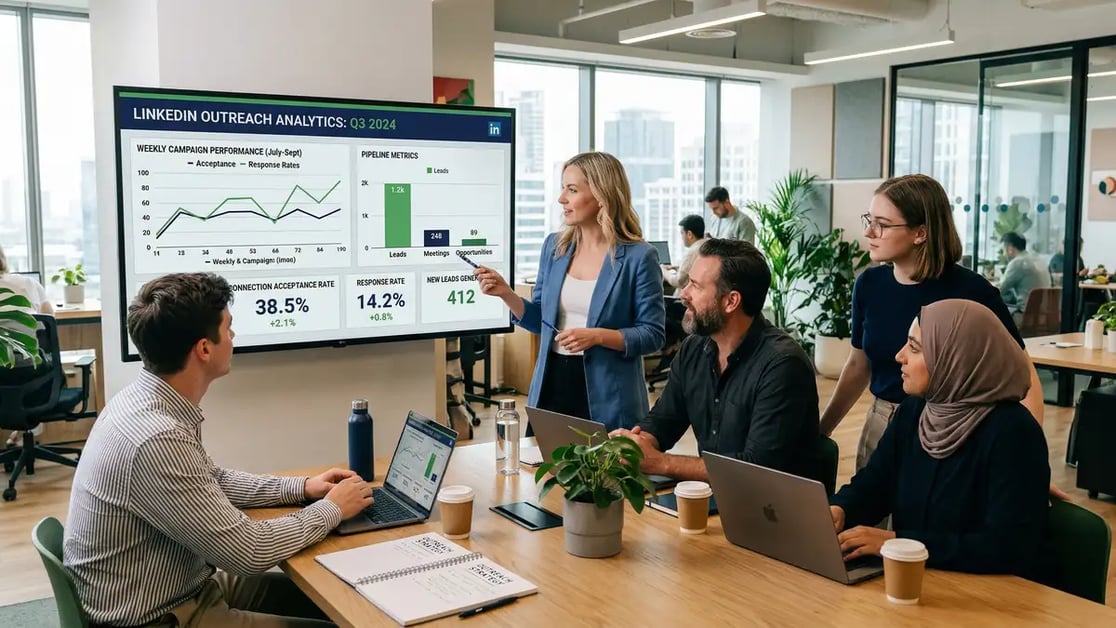
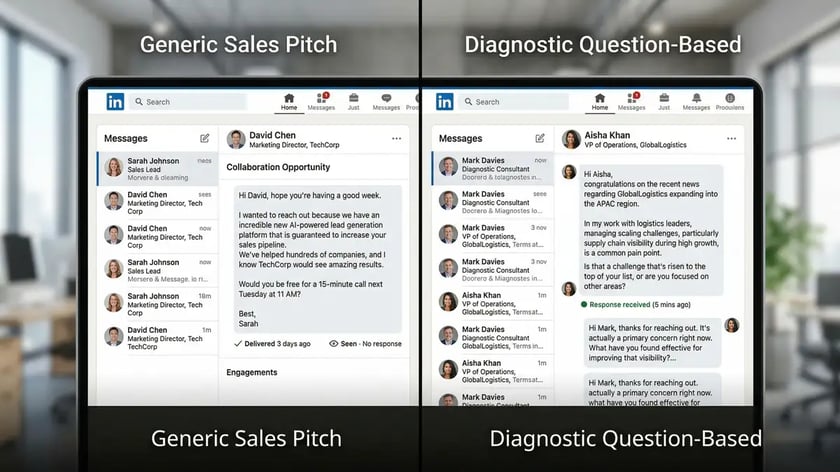
The data on diagnostic messaging versus pitch-first outreach is unambiguous. Messages that lead with prospect pain points receive 47% higher response rates than product-focused openers, according to M1 Project research. This isn't a marginal improvement — it's the difference between a pipeline that scales and one that stalls.
Diagnostic messaging works because it flips the conversation from seller-centric to buyer-centric. Instead of "We help companies like yours with X," a diagnostic opener asks: "What's your current approach to [specific challenge]?" This question-led framework does three things simultaneously: it demonstrates you've researched the prospect, it creates a natural conversation thread, and it positions you as a strategic advisor rather than a vendor.
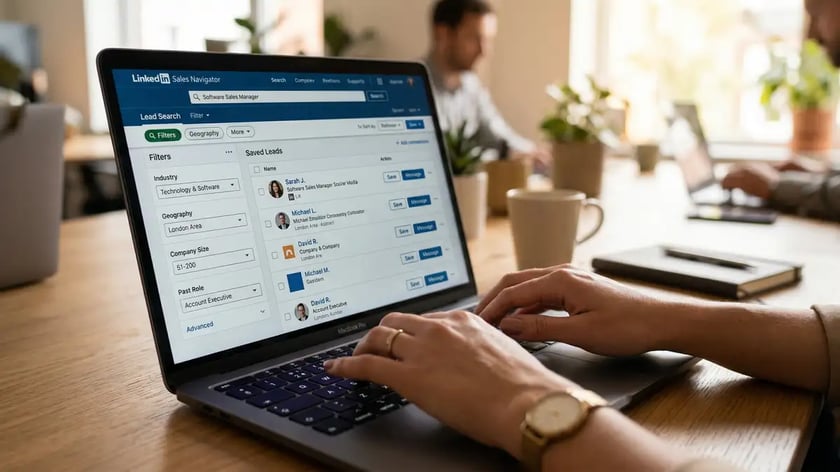
Belkins' analysis of 20 million LinkedIn outreach attempts quantifies the impact: personalized connection requests boost subsequent reply rates from 5.44% to 9.36%, a 72% improvement from the same connected audience. The acceptance rate itself stays flat at approximately 26% regardless of personalization — but the downstream engagement multiplies when prospects receive a diagnostic question rather than a pitch.
Sequences of 3–5 messages, each focused on a separate pain point, increase reply rates by 42% compared to campaigns repeating identical messaging. This phased diagnostic approach — introducing and exploring different challenges sequentially — allows prospects to engage from their evolving awareness rather than forcing immediate product evaluation. Hunter.io's 2026 data confirms: using 3 messages instead of 1 increases total replies by 106%.
| Messaging Approach | Response Rate | Conversion Impact |
| Generic product pitch | 5.44% | Baseline |
| Name-only personalization | 6.2% | +14% |
| Pain-point diagnostic opener | 9.36% | +72% |
| Multi-touch diagnostic sequence (3-5 msgs) | 11.87% | +118% |
| Profile visit + diagnostic message | 11.87% | +118% |
Sources: Belkins LinkedIn Outreach Study, M1 Project
Soft calls-to-action amplify the effect. Decision-makers explicitly prefer "Can I send more info?" and "Open to learning more?" over immediate meeting scheduling demands. Research shows soft CTAs increase response rates by 27% compared to product-focused CTAs. LinkedIn Lead Gen Forms demonstrate the same principle: pre-filled forms achieve 13% conversion rates — five times the 2.35% industry-standard landing page conversion — because they eliminate friction.
How Should You Structure a LinkedIn Outreach Automation Sequence?
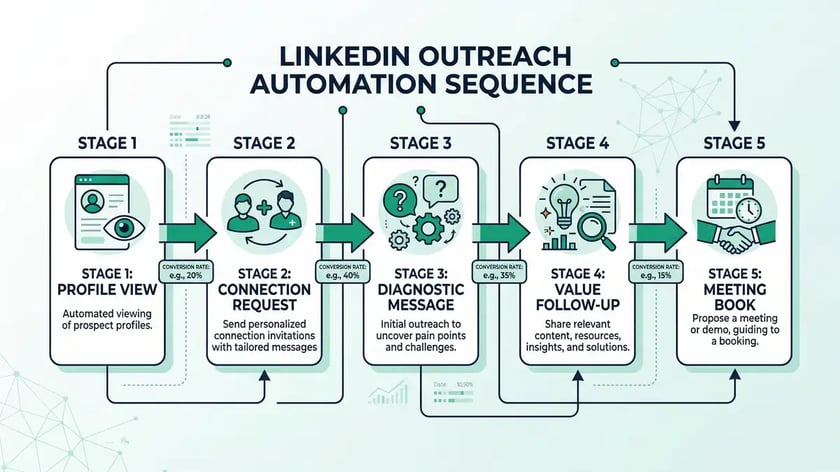
The most effective LinkedIn outreach automation sequences follow a 5-stage architecture that warms prospects before asking for commitment. Each stage builds on the previous one, creating familiarity and trust before the diagnostic conversation begins. This mirrors the sales automation principle of logic-gated progression — prospects only receive the next touchpoint when they've signaled readiness.
Profile View (Day 1)
Visit the prospect's LinkedIn profile. This creates a notification that puts your name and headline in front of them. Combined with subsequent messaging, profile visits plus direct messages achieve 11.87% reply rates — significantly higher than cold messages alone. Your profile must be optimized with a clear value proposition before you start.
Connection Request with Context (Day 2-3)
Send a personalized connection request referencing something specific — a recent post, a shared connection, or a relevant industry challenge. Connection acceptance rates average 29.61%–45% for targeted campaigns. Do not pitch in the connection note. The goal is acceptance, not conversion.
Diagnostic Message (Day 4-5 after acceptance)
Once connected, send a question-led message that explores their situation: "I noticed [company] is [specific observation]. How are you currently handling [specific challenge]?" This diagnostic opener positions you as a peer, not a vendor. It's where the 72% reply rate improvement over generic pitching materializes.
Value Follow-Up (Day 7-10 if no reply)
Share a relevant insight, case study, or data point that relates to their challenge. 55% of all replies come from follow-up messages, not initial contact. The follow-up should demonstrate expertise, not repeat the ask. Reference the original diagnostic question to maintain thread coherence.
Meeting Book with Soft CTA (Day 12-15)
If they've engaged (liked, replied, viewed your profile), propose a specific next step with a soft CTA: "Would it be useful to walk through how [similar company] solved [their challenge]? Happy to share the framework — no pitch." Soft CTAs increase response rates by 27% versus hard scheduling requests.
Key Takeaway
The 5-stage diagnostic sequence works because it mirrors how B2B buyers actually make decisions. Four out of five LinkedIn members drive business decisions at their organizations, and 75% of B2B buyers use social media to inform purchasing decisions. By leading with questions instead of pitches, you align with their evaluation process rather than interrupting it.
What Are LinkedIn's 2026 Automation Limits and How Do You Stay Compliant?
LinkedIn's automation crackdown in 2026 fundamentally changed the risk profile for outreach tools. The platform no longer relies on simple volume thresholds — LinkedIn's machine learning systems now analyze 20+ behavioral signals to identify automation, including sequential connection patterns, consistent time intervals between actions, template-detected message semantics, and low engagement-to-activity ratios.
| Action | Free Account Limit | Sales Navigator Limit | Safe Automation Threshold |
| Connection requests | ~100/week | 100-200/week | 20/day (140/week) |
| Profile views | ~100/day | ~250/day | 50-100/day |
| Direct messages (1st degree) | 50/day | 125/day | 30-50/day |
| InMail credits | 0 | 50/month | Use all (platform-sanctioned) |
Sources: PhantomBuster LinkedIn Limits Guide, Dux-Soup, ConnectSafely
Account enforcement escalates through four levels. Level 1 imposes soft limits on connection requests lasting 1–2 weeks. Level 2 enforces hard restrictions for 2–4 weeks. Level 3 triggers account review and identity verification. Level 4 results in permanent account disablement with IP flagging. Users report progression from zero warnings to Level 2 restrictions within days of deploying aggressive automation, as detailed by MeetAlfred's compliance guide.
The critical distinction: engagement-based automation reports zero account ban rates. Automating strategic commenting on prospect posts, thoughtful engagement with relevant content, and visibility building through consistent activity aligns with LinkedIn's platform goals. ConnectSafely's analysis found that engagement-based automation generates 14.6% close rates versus 1.7% for pure cold outreach automation. The compliance-safe approach isn't just safer — it performs 8.6x better.
Avoid This Mistake
The most expensive LinkedIn automation error isn't a tool subscription — it's losing your account. Firms running volume-based cold outreach automation face 25–40% account restriction rates within six months. Before deploying any automation workflow, ensure your tool uses randomized delays, respects conservative daily limits (20 connections, 50 messages), and prioritizes engagement-based signals over connection volume. Your LinkedIn profile is a non-renewable asset — treat it accordingly.
Ready to architect a compliant lead generation system that scales without account risk?
Book Your Growth Mapping CallHow Do Multi-Channel Sequences Compare to LinkedIn-Only Outreach?
Multi-channel outreach sequences combining LinkedIn, email, and phone generate 287% higher conversion rates than single-channel email efforts, according to Landbase's multi-channel research. This three-channel multiplier reflects the reality that buyers engage on different platforms at different stages — some respond to email, others to LinkedIn, others need a phone call.
The sequence structure matters as much as the channel mix. Research indicates that starting with email (establishing context), following with a LinkedIn connection (building credibility), then a phone call (personal touch) creates the optimal progression. Each channel reinforces the previous touchpoint. A LinkedIn connection request that references "the email I sent Tuesday about [challenge]" converts at measurably higher rates because it demonstrates persistence without pressure.
| Channel Strategy | Conversion Rate | Improvement vs Email-Only |
| Email only | Baseline | — |
| Email + LinkedIn | 2.1x baseline | +110% |
| Email + LinkedIn + Phone | 3.87x baseline | +287% |
| 3+ channels with content engagement | Up to 4.94x baseline | +394% |
Sources: Landbase Multi-Channel Statistics, Salaria Sales, Martal Omnichannel Statistics
For B2B companies already running cold email outreach, adding LinkedIn as a parallel channel is the highest-leverage improvement available. The cold email infrastructure handles volume and initial context, while LinkedIn provides the personal credibility layer that converts awareness into conversations. Combined with a CRM automation system that tracks engagement across both channels, this multi-channel architecture creates a self-reinforcing pipeline engine.
What Does LinkedIn Outreach Automation Actually Cost — and What's the ROI?
The investment case for LinkedIn outreach automation comes down to three numbers: cost per lead, pipeline contribution, and tool stack expense. Every metric favors LinkedIn over traditional channels for B2B prospecting.
LinkedIn's cost per lead is 28% lower than Google AdWords for B2B audiences, according to Sopro's benchmarking data. When combining a Sales Navigator subscription ($79.99/month annual) with an automation tool ($99/month average), the effective cost per qualified lead drops to approximately $8–$25 — a fraction of LinkedIn's paid advertising CPL of $408 average.
| Channel | Average Cost Per Lead | Response/Conversion Rate |
| LinkedIn outreach automation | $8–$25 | 10.3% response rate |
| Cold email outreach | $15–$50 | 5.1% response rate |
| LinkedIn paid advertising | $408 average | 13% form conversion |
| Google Ads (B2B) | $110–$350 | 2.35% landing page conversion |
Sources: Sopro B2B CPL Benchmarks, Kondo LinkedIn CPL Analysis, Expandi
The Forrester Total Economic Impact study provides the most credible third-party ROI validation: LinkedIn Sales Navigator delivers 312% ROI over three years with payback under six months. The composite organization analyzed — 250 Sales Navigator users investing $1.5 million over three years — realized $6.25 million in quantifiable benefits, including $2.6 million in sales research efficiencies and year-over-year revenue growth averaging 8%, according to SalesTech Scout's analysis of the Forrester study.
For firms deploying the diagnostic messaging approach through an AI automation agency or agentic workflow architecture, the ROI compounds further. Engagement-based automation eliminates the cost of account rebuilding after restrictions, reduces manual message crafting time, and generates higher-quality conversations that convert at 14.6% close rates — 8.6x the 1.7% rate of cold-only approaches.
Key Takeaway
LinkedIn outreach automation delivers the lowest cost per lead of any B2B channel when executed with diagnostic messaging. At $8–$25 per qualified lead versus $408 for LinkedIn ads and $110–$350 for Google Ads, the economics are conclusive. The key is combining Sales Navigator's targeting precision with AI-powered personalization and compliance-safe automation — not choosing between them.
When Should You Send LinkedIn Messages for Maximum Response?
Timing optimization provides a material but secondary lever for LinkedIn outreach performance. Belkins' research found that Tuesday achieves the highest reply rate at 6.90%, followed closely by Monday at 6.85%. Saturday drops to 6.40% for replies and a dramatic 1.36% for connection acceptance.
Time-of-day data narrows the window further. Prospects most likely reply at 10:00 AM, establishing mid-morning as the optimal send window. SendIQ's InMail benchmarks specify that messages sent Tuesday–Thursday between 8–10 AM or 2–4 PM perform best, with Monday mornings and Friday afternoons seeing 20% lower response rates. These patterns reflect professional meeting density — early morning before meetings and post-lunch after internal calls represent prime engagement windows.
Monthly seasonality also plays a role. January leads with the highest reply rate at 7.51%, driven by professional refresh at year-start. April shows a peak at 7.26% from post-Q1 review momentum. For executive search firms and service businesses running LinkedIn outreach, aligning campaign launches with these seasonal peaks creates compounding advantages across the entire proposal automation pipeline.
Frequently Asked Questions
What is the best LinkedIn outreach automation tool for B2B?
The best LinkedIn outreach automation tool depends on your compliance requirements and sequence complexity. Engagement-based tools like Dux-Soup and Expandi prioritize compliance with preconfigured safety limits and randomized delays. For multi-channel sequences combining cold email and LinkedIn, platforms like LaGrowthMachine and Lemlist offer integrated workflows. The critical selection criteria in 2026 is whether the tool respects LinkedIn's behavioral detection signals — not just volume limits. Tools with zero account ban rates use engagement-first approaches rather than connection-request volume.
How many LinkedIn connection requests can I send per day without getting banned?
Safe automation thresholds conservatively limit connection requests to 20 per day (140 weekly), well below LinkedIn's published limits of 100–200 weekly for Premium accounts. LinkedIn's machine learning detection identifies accounts consistently maxing limits as likely automated, regardless of published compliance. Conservative daily limits combined with randomized delays, varied prospect segments, and genuine engagement activity maintain account safety while still generating meaningful pipeline volume through higher-quality LinkedIn lead generation.
Does personalized LinkedIn outreach really outperform generic messages?
The data is unambiguous. Personalized connection requests boost reply rates from 5.44% to 9.36% — a 72% improvement — according to Belkins' analysis of 20 million outreach attempts. Messages addressing specific pain points receive 47% higher response rates than product-pitch openers. Only 5% of senders personalize every message, but those who do see 2–3x better results. The investment in personalization — whether manual research or AI-powered workflow automation — pays measurable dividends at every pipeline stage.
What response rate should I expect from LinkedIn outreach?
Benchmark response rates vary by approach. Generic cold outreach averages 5.44% reply rates. Personalized diagnostic messaging achieves 9.36%. Multi-touch sequences combining profile visits and messages reach 11.87%. InMail campaigns average 18–25%, with top performers hitting 35–40%. These benchmarks assume targeted prospect lists and relevant B2B audiences — untargeted mass outreach performs significantly worse. For realistic planning, model 8–12% response rates for well-executed diagnostic sequences targeting your ideal customer profile.
How does LinkedIn outreach automation integrate with email sequences?
Multi-channel sequences combining LinkedIn and email generate 287% higher conversion rates than email-only approaches. The optimal structure starts with email (establishing context), follows with LinkedIn connection (building credibility), then uses LinkedIn messaging for personal touch after connection acceptance. A CRM automation system tracks engagement across both channels, triggering the next touchpoint based on prospect behavior rather than fixed timing. This orchestrated approach ensures no prospect falls through the gap between channels.
Is LinkedIn outreach automation legal and compliant with LinkedIn's terms of service?
LinkedIn's terms of service prohibit unauthorized automated data collection and messaging. However, many automation tools operate within a compliance gray area by mimicking human behavior patterns. The safest approach uses engagement-based automation — automating profile views, content engagement, and strategic commenting — which aligns with LinkedIn's platform goals and produces zero account bans. For direct messaging automation, tools with preconfigured safety limits, randomized delays, and agentic workflow architectures that respect behavioral detection signals minimize risk while maintaining pipeline generation.
Deploy the LinkedIn Outreach Infrastructure Your B2B Pipeline Demands
peppereffect architects diagnostic messaging systems that generate qualified conversations at scale — without account risk. From Sales Navigator optimization to multi-channel sequence automation, we install the lead generation engine that decouples your pipeline from manual prospecting.
Book Your Growth Mapping CallResources
- Expandi — State of LinkedIn Outreach 2025: Response Rate and Benchmark Data
- Belkins — B2B LinkedIn Outreach Benchmarks: 20 Million Message Analysis
- ConnectSafely — LinkedIn Automation Crackdown 2026: Why Inbound Wins
- Sopro — 62 LinkedIn Lead Generation Statistics for 2025
- Landbase — 35 Multi-Channel Outreach Statistics: Data-Driven Strategies
- SalesTech Scout — LinkedIn Sales Navigator Cost Guide and ROI Analysis 2025
- Hunter.io — The State of Email Outreach 2026
diagnostic outreach methodology LinkedIn lead generation for B2B LinkedIn profile optimization