

What Are HubSpot SEO Tools and Why Do They Matter for B2B Growth?
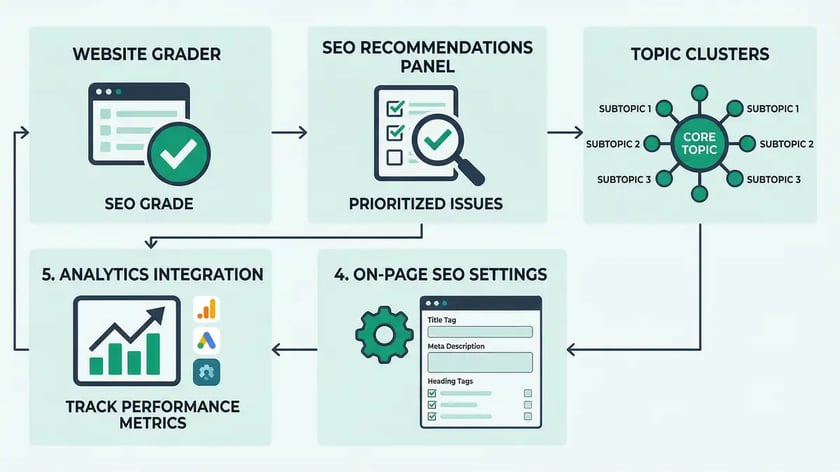
HubSpot SEO tools are a suite of built-in search optimization features embedded directly inside HubSpot's CMS and Marketing Hub — spanning SEO Recommendations, Topic Clusters, on-page configuration, Google Search Console integration, and the new Answer Engine Optimization (AEO) Grader. Unlike standalone SEO platforms that sit outside your publishing workflow, HubSpot's tools surface optimization guidance at the moment you create content, eliminating context-switching and accelerating time-to-publish.
For B2B companies running on HubSpot, the practical impact is significant. Companies migrating from WordPress to HubSpot CMS report a 110% increase in web traffic, a 65% increase in inbound leads, and a 15% increase in deals generated within six months, according to a 2025 G2-based buyer comparison. The reason: when SEO for B2B companies is natively integrated with CRM and marketing automation, every optimization decision connects directly to pipeline data — not just vanity traffic metrics.
Yet most B2B teams use barely a fraction of what's available. They publish blog posts, check the green SEO dot in the editor, and move on — leaving the topic cluster architecture, GSC integration, and AEO visibility tools untouched. This guide walks through every HubSpot SEO tool available in 2026, with the exact workflows, configuration steps, and benchmarks you need to extract full value from the platform.
What you'll learn in this guide:
- How the SEO Recommendations tool scans your pages across five categories and prioritizes fixes by impact
- How to configure Topic Clusters that build topical authority and compound organic visibility
- On-page SEO settings — meta tags, canonicals, hreflang, and URL structure inside HubSpot
- Google Search Console integration for topic-level performance tracking
- The new AEO Grader for measuring AI search visibility across ChatGPT, Perplexity, and Gemini
- Pricing tiers and which SEO features unlock at each subscription level
- The ten most common HubSpot SEO mistakes and how to avoid them
Key Takeaway
HubSpot SEO tools deliver the most value when used as an integrated system — not as isolated features. Teams that combine Topic Clusters with GSC integration, on-page optimization, and AEO monitoring build compounding organic visibility that standalone SEO platforms cannot replicate inside a CMS workflow.

How Does the HubSpot SEO Recommendations Tool Work?
The SEO Recommendations tool functions as an automated content scanner that continuously evaluates your pages and surfaces findings directly within the content editor and SEO dashboard. Rather than requiring you to navigate to a separate audit platform, recommendations appear contextually where content is created — reducing friction and encouraging action at the moment of publication.

Recommendations are organized across five primary categories: accessibility issues (missing image alt text), technical SEO problems (blocked content, invalid canonicals, missing hreflang tags), on-page optimization gaps (vague meta descriptions, thin content below 300 words), performance concerns (oversized images, broken resources), and structured data deficiencies (missing schema markup). Each recommendation is tiered by estimated SEO impact, technical difficulty, and recommended role — marketer versus developer — so your team can prioritize quick wins independently while escalating technical issues with clear context.
The real value lies not in individual recommendations but in identifying systemic patterns across your content library. If dozens of pages lack meta descriptions or have oversized hero images, the aggregated view in the SEO dashboard reveals template-level fixes that resolve issues across multiple assets simultaneously. This is where the tool shifts from a checklist into an SEO content marketing operating system — surfacing the highest-leverage improvements first.
HubSpot validates canonical links against six specific conditions: ensuring only one canonical link exists per page, confirming it's a valid absolute URL, verifying it doesn't point to a different domain or language variation unless intentional, and checking it doesn't redirect to the site root. For B2B website architecture, getting canonicals right prevents authority dilution across your domain.
| SEO Category | What It Scans | Who Fixes It |
| Accessibility | Missing image alt text, ARIA labels | Marketer |
| Technical SEO | Blocked content, invalid canonicals, missing hreflang | Developer |
| On-Page Optimization | Meta titles, descriptions, thin content (<300 words) | Marketer |
| Performance | Oversized images, broken CSS/JS/fonts | Developer |
| Structured Data | Missing or invalid schema markup | Developer |
Source: HubSpot Knowledge Base — Understand SEO Recommendations
How Do HubSpot Topic Clusters Build Topical Authority?
Topic clustering in HubSpot implements a content architecture model that deviates significantly from traditional keyword-focused publishing. Instead of publishing isolated blog posts around discrete keywords, topic clustering organizes content into families: a pillar page that comprehensively covers a broad topic (3,000–6,000+ words), coupled with cluster articles that address specific subtopics, with systematic internal linking back to the pillar and between related cluster content.
The quantified impact is dramatic. One marketing agency grew organic blog traffic from 500 monthly visitors to nearly 190,000 — a 37,900% increase — by implementing structured topic clusters on HubSpot, according to Performance Marketing Advisors. This wasn't a single viral post — it was systematic coverage of a topic family with proper internal linking that compounded organic visibility month over month.
Configuration begins at Content → SEO → Topic Clusters, where you create topics that serve as primary organizational units. HubSpot tracks monthly search volume and difficulty score (sourced from Semrush data) for each topic, helping you prioritize based on opportunity. Each topic supports up to 100 subtopic keywords, though HubSpot's best practice recommends starting with 8–12 high-quality cluster articles that address distinct search intents rather than trying to fill all 100 slots.
Create Your Topic
Navigate to Content → SEO → Topic Clusters. Enter your pillar topic keyword. HubSpot displays monthly search volume and difficulty score to help you evaluate opportunity versus competition.
Attach a Pillar Page
Designate a comprehensive, ungated page as the central hub. The pillar page should include the topic keyword in the title, URL, and H1 tag. Never gate pillar content behind forms — it prevents crawler indexing and reduces authority value.
Add 8–12 Subtopic Keywords
Map cluster articles to specific search queries. Each subtopic should address a distinct intent — for example, if your pillar covers "HubSpot SEO," subtopics might include "HubSpot SEO tools," "HubSpot topic clusters," and "HubSpot SEO audit."
Validate Internal Links
HubSpot's visual coverage map uses color-coded indicators: green lines show subtopics with proper pillar links, red lines indicate missing links, and gray lines show missing content. Use the "Check Link" button to re-verify after updates.
Monitor Topic-Level Analytics
Navigate to Content → SEO → Topics → View topic analytics to see how organic traffic flows through your cluster. Track sessions, bounce rate, and conversion at the topic level — not just individual pages.
Critical Limitation
Creating topic clusters in HubSpot does not directly affect SEO rankings. As HubSpot states explicitly, the platform functions as an organizational framework. The SEO value comes from implementing the architecture — publishing related content, linking it correctly, and optimizing for search intent — not from the act of tagging content within HubSpot's interface.

What On-Page SEO Settings Does HubSpot Provide?
On-page SEO configuration in HubSpot covers the foundational elements that communicate page intent to search engines: page titles, meta descriptions, canonical URLs, hreflang tags, Open Graph tags, robots directives, and URL slugs. These fields are surfaced prominently during content creation, making it difficult to overlook them — a design advantage over platforms that bury SEO settings in sidebar panels.
Page titles should be 50–60 characters, include the target keyword near the beginning, and clearly communicate page purpose. Meta descriptions should be 155–160 characters, include the target keyword naturally, and promise specific value to searchers. These two elements represent the highest-impact on-page signals within HubSpot's SEO recommendations, according to HubSpot's own SEO guide.
Canonical tags instruct search engines which version of a page to treat as authoritative when multiple URLs contain similar content. This is critical for multilingual sites — each language variation needs a self-referencing canonical (pointing to its own URL), not all variants pointing to the English version. Teams that consolidate all canonicals on one language variant inadvertently destroy ranking potential for every other language.
Hreflang tags are generated automatically when you create multi-language content variations in HubSpot, eliminating manual XML syntax and reducing configuration errors. URL slugs should be short, descriptive, and include relevant keywords — HubSpot warns when slugs duplicate across the site, preventing accidental duplicate content. Robots.txt is editable directly for each connected domain, and the platform supports noindex meta tags via the Head HTML field for pages you want crawlable but hidden from search results.
Need help architecting your HubSpot SEO infrastructure? See how peppereffect deploys marketing infrastructure that turns your CMS into a growth engine.
Book Your Growth Mapping CallHow Does Google Search Console Integration Work in HubSpot?
HubSpot's GSC integration transforms Google Search Console from a separate tab into a unified data source within HubSpot's analytics and SEO dashboards. Once connected via the HubSpot Marketplace, GSC data flows directly into topic cluster views and individual page performance panels — showing impressions, clicks, click-through rates, and average position organized by topic rather than by URL alone.

This topic-level organization is significantly more useful for B2B teams than page-level data. It reveals whether an entire topic cluster is gaining visibility or only specific supporting content is ranking — a distinction that changes your content investment decisions entirely. For teams running HubSpot Content Hub Professional or Enterprise, SEO Analytics reports add historical trend analysis and deeper segmentation by topic, keyword, content type, and date range.
Attribution reporting connects search traffic to business outcomes by showing which content pieces influence contact creation, deal creation, and revenue. HubSpot supports multiple attribution models — first-touch, last-touch, linear, U-shaped, W-shaped, and time-decay. For B2B teams with longer sales cycles, W-shaped attribution typically provides the most accurate picture, crediting awareness content (first touch), lead-nurturing content (lead creation), and sales-enablement content (opportunity creation) with 30% each.
A critical prerequisite: populate the "Amount" field on deal records with actual deal values. Without this, attribution reports show which channels influence conversions but cannot calculate ROI — undermining the core business case for CRM automation and integrated SEO analytics.
| GSC Metric | What It Measures | Where to Find It in HubSpot |
| Impressions | Times your page appeared in Google results | SEO → Topic Clusters tab |
| Clicks | Clicks from Google search results to your site | SEO → Topic Clusters tab |
| CTR | Clicks ÷ Impressions (percentage) | Page editor → Optimization tab |
| Average Position | Average ranking across all queries for that page | Traffic analytics → Topics view |
Source: HubSpot Knowledge Base — GSC Metrics
Key Takeaway
GSC integration is available only in Marketing Hub or Content Hub Professional and Enterprise tiers. Teams on free or Starter tiers cannot access GSC data inside HubSpot and must rely on manual collection or third-party reporting platforms.
What Is the HubSpot AEO Grader and How Does It Track AI Visibility?
The Answer Engine Optimization (AEO) Grader, launched in 2026, addresses a category of search visibility that traditional SEO tools do not measure. The AEO Grader analyzes your brand's visibility across three major generative AI platforms: GPT-4o (ChatGPT), Perplexity, and Gemini — tracking citation frequency, sentiment patterns, contextual positioning, and share-of-voice against competitors.
The grader categorizes brands as Leader, Challenger, or Niche Player based on mention prominence, sentiment quality, and patterns across different query types. This competitive intelligence reveals which brands receive preferential positioning by language models and provides a roadmap for improving AI visibility through content optimization. Practitioners describe the AEO Grader as "the best thing HubSpot has done since the Website Grader" — filling a critical measurement gap that even sophisticated SEO platforms had not addressed.
The two grading tools serve complementary purposes: the Website Grader identifies technical and on-page issues affecting traditional search, while the AEO Grader identifies content structure issues affecting AI retrievability. A site can score highly on the Website Grader but poorly on the AEO Grader if content is keyword-optimized but lacks the clear, structured answers that AI systems extract and cite. For a deeper dive into optimizing for AI search engines, see our guides on answer engine optimization and generative engine optimization.
As of 2026, 92% of marketers globally are optimizing for both traditional and AI-powered search engines, according to HubSpot's marketing statistics. Yet most lack tools to quantify their AI visibility — creating competitive advantage for early adopters who establish baseline measurements and iterate systematically.
Which HubSpot Pricing Tier Unlocks Which SEO Features?
HubSpot's SEO tools are distributed across multiple product tiers, with basic features in the free tier and advanced capabilities locked behind Professional and Enterprise subscriptions. Getting this wrong means either overpaying for features you don't use or, more commonly, operating without critical tools like topic clustering and GSC integration that make the platform's SEO capabilities worthwhile.
| Tier | Monthly Price | Key SEO Features |
| Free | $0 | Basic recommendations, 25 pages, SSL, CDN |
| Content Hub Starter | $20/seat | Unlimited pages, no branding, AI content creation |
| Content Hub Professional | $500 (3 seats) | Topic Clusters, A/B testing, content staging, advanced SEO |
| Marketing Hub Professional | $890 (3 seats) | Full SEO Analytics, GSC integration, attribution reporting |
| Content Hub Enterprise | $1,500 (5 seats) | Multi-domain, content partitioning, approval workflows |
| Marketing Hub Enterprise | $3,600 (5 seats) | Custom objects, advanced personalization, 24/7 support |
Sources: Pixcell — HubSpot Content Hub, Cargas — HubSpot Pricing
For most mid-market B2B organizations, Content Hub Professional ($500/month) is the minimum viable tier for serious SEO work. It unlocks topic clustering, integrated SEO strategy features, A/B testing, and content staging environments. Teams that also need attribution reporting connecting SEO traffic to deal revenue should add Marketing Hub Professional ($890/month) to unlock the full analytics suite and GSC integration.
What Are the Most Common HubSpot SEO Mistakes (and How Do You Fix Them)?
B2B teams implementing HubSpot SEO tools encounter predictable failure patterns. Understanding these mistakes prevents wasted optimization effort and accelerates the path to measurable results.
Mistake 1: Misconfiguring canonical tags on multilingual sites. Teams often set all language variations to canonical to the English page, destroying ranking potential for other languages. The correct configuration: each language variant canonicalizes to itself.
Mistake 2: Creating topic clusters without internal linking discipline. Teams build topic structures in HubSpot's interface but forget to add contextual links from cluster articles back to the pillar page. Without internal links, topic clusters are just metadata labels — Google's crawler cannot see them. Use HubSpot's visual red-line indicators to identify and fix missing links.
Mistake 3: Publishing content without keyword research. Comprehensive content targeting keywords with zero search volume produces zero organic traffic regardless of quality. SEO copywriting starts with validating demand before investing writing time.
Mistake 4: Neglecting on-page fundamentals. Missing meta descriptions, generic page titles, and poor header hierarchy are simple to fix and have measurable impact on click-through rates. The SEO Recommendations tool flags these automatically — review and resolve them before publishing.
Mistake 5: Skipping schema markup. Structured data in JSON-LD format enables rich results in Google and improves language model retrievability for AI-powered search. FAQPage, Article, and BreadcrumbList schemas are the highest-leverage types for B2B blog content.
Mistake 6: Ignoring Core Web Vitals. Google's performance metrics — LCP under 2.5 seconds, INP under 200ms, CLS under 0.1 — directly affect all rankings. HubSpot's CMS handles automatic image optimization, HTTP/2, minification, CDN, and Brotli compression, but teams uploading oversized images or adding heavy third-party scripts can still degrade performance.
Mistake 7: Not optimizing for answer engines. Content optimized purely for keyword matching may rank in traditional search but appear marginally in AI-generated answers if it lacks clear structure and direct answers. Use the AEO Grader to measure visibility in ChatGPT, Perplexity, and Gemini — then iterate based on the data.
Key Takeaway
The most damaging HubSpot SEO mistakes are systemic, not technical. Teams that build topic clusters without linking discipline, publish without keyword validation, or ignore AEO visibility create compounding problems that no individual page fix can resolve. Quarterly audits of cluster performance, internal linking health, and AI visibility baselines prevent these patterns from taking root.
Frequently Asked Questions
Is HubSpot good for SEO?
HubSpot is strong for SEO when used at the Professional tier or above, where Topic Clusters, GSC integration, and advanced SEO analytics unlock. Companies migrating from WordPress to HubSpot CMS report a 110% increase in web traffic and a 65% increase in inbound leads within six months. The platform excels at on-page optimization, content strategy, and topic clustering. For advanced technical audits, backlink analysis, or competitive keyword research, most teams supplement HubSpot with tools like Ahrefs or Semrush alongside HubSpot's native capabilities.
What SEO tools are built into HubSpot?
HubSpot includes five core SEO tools: the SEO Recommendations scanner (five audit categories), Topic Clusters (pillar-subtopic architecture with visual link validation), on-page SEO configuration (meta tags, canonicals, hreflang, robots.txt), Google Search Console integration (impressions, clicks, position tracking), and the AEO Grader (AI visibility across ChatGPT, Perplexity, and Gemini). Breeze AI additionally automates meta description writing, internal linking, and topic suggestion based on historical content performance.
How do I set up Topic Clusters in HubSpot?
Navigate to Content → SEO → Topic Clusters. Create a topic with your pillar keyword, attach a comprehensive pillar page, then add 8–12 subtopic keywords with associated cluster content. Each cluster article must contain an internal link back to the pillar page — HubSpot's visual map shows green (linked), red (missing link), or gray (missing content) status for each subtopic. Start with fewer high-quality subtopics rather than filling all 100 available slots.
Does HubSpot integrate with Google Search Console?
Yes, but only on Marketing Hub Professional/Enterprise or Content Hub Professional/Enterprise tiers. The integration brings impressions, clicks, CTR, and average position data directly into HubSpot's topic cluster views and page performance panels. Authenticate through the HubSpot Marketplace by installing the Google Search Console integration. Ensure all content domains are verified properties in both platforms.
What is the HubSpot AEO Grader?
Launched in 2026, the AEO Grader tracks your brand's visibility across ChatGPT, Perplexity, and Gemini — measuring citation frequency, sentiment, and share-of-voice in AI-generated answers. It categorizes brands as Leader, Challenger, or Niche Player and provides actionable recommendations for improving AI visibility. This complements the Website Grader, which evaluates traditional SEO health. Together they cover both conventional and AI-driven content discovery channels.
How much does HubSpot SEO cost?
Basic SEO recommendations are free. Content Hub Professional ($500/month, 3 seats) unlocks Topic Clusters, A/B testing, and advanced SEO tools. Marketing Hub Professional ($890/month, 3 seats) adds GSC integration, SEO Analytics dashboards, and attribution reporting. Enterprise tiers ($1,500–$3,600/month) add multi-domain management and approval workflows. Most mid-market B2B teams find Professional tier sufficient for comprehensive SEO operations.
Can HubSpot replace standalone SEO tools like Ahrefs or Semrush?
For smaller B2B teams with limited technical SEO expertise, HubSpot alone can accomplish ranking goals through its native on-page optimization, topic clustering, and content strategy tools. However, teams running sophisticated SEO programs requiring competitive analysis, detailed backlink auditing, position tracking across thousands of keywords, or advanced technical crawling benefit from maintaining specialized tools alongside HubSpot. The platform's strength is integration with CRM and content workflows, not depth of standalone SEO analysis.
Deploy Your HubSpot SEO Infrastructure
peppereffect architects complete marketing infrastructure systems on HubSpot — from topic cluster strategy through AEO optimization and pipeline attribution. Stop treating SEO as a checklist and start treating it as a growth engine.
Book Your Growth Mapping CallResources
- HubSpot Knowledge Base — Understand SEO Recommendations
- HubSpot Knowledge Base — Pillar Pages, Topics, and Subtopics
- HubSpot Knowledge Base — Google Search Console Integration
- HubSpot AEO Grader — Generative Engine Optimization Tool
- HubSpot Blog — How AI Is Impacting SEO
- HubSpot Blog — GEO Best Practices
- Growth London — How to Add Schema to HubSpot for AEO
- Performance Marketing Advisors — How Do HubSpot Topic Clusters Help SEO?